
Update: 16/3/2015 – Corrections & additions to WP8 Nextgen Reader & Magnify, Weave Server deactivated
Update: 15/3/2015 – More in-depth review of NextGen Reader for Windows 8 & WP8
Update: 12/3/2015 – additional info for NextGen Reader for WP8
Weave is no more!
Weave News Reader was one of the first and one of the best news reader for the Windows Phone platform. I started using it when it was Windows Phone News. It is a Windows Phone exclusive app from Windows Phone 7 till now but like we Chinese say, “There’s no celebration/banquet that lasts forever.” Weave stopped working on 16 March 2015, with @Selesgames pulling the plug on the Weave server. This also means that Weave for Windows 8.x has stopped working as well.
@Selesgames has posted on Windows Central regarding the abrupt decision and while I’m sad that Arash Emami, the sole proprietor of @Selegames, is discontinuing Weave, I’m happy that he’s joining LinkedIn. Hopefully he can do something about the LinkedIn app in Windows 8 / WP8 & Windows 10.
I exclusively use Weave (Windows 8/WP8) for news on Windows, Windows Phone, Technology in general, Science & Astronomy, World News and Self-help. In fact, based on Battery sense, Weave is usually the single biggest usage of Battery!
So what’s next for users like me? Well I think it’s time to do a comparative review of some of the best news reader for the Windows/Windows Phone platform.
The contenders
There are many great news aggregator in the Windows Store but I have chosen these few to compare against Weave. The areas that I’ll compare include ease of initial & subsequent setup of accounts & feeds, ease of synchronization between devices including Windows & Phones, speed of app in pulling feeds online & offline, speed in displaying news aggregate and individual articles, UX and customisations.
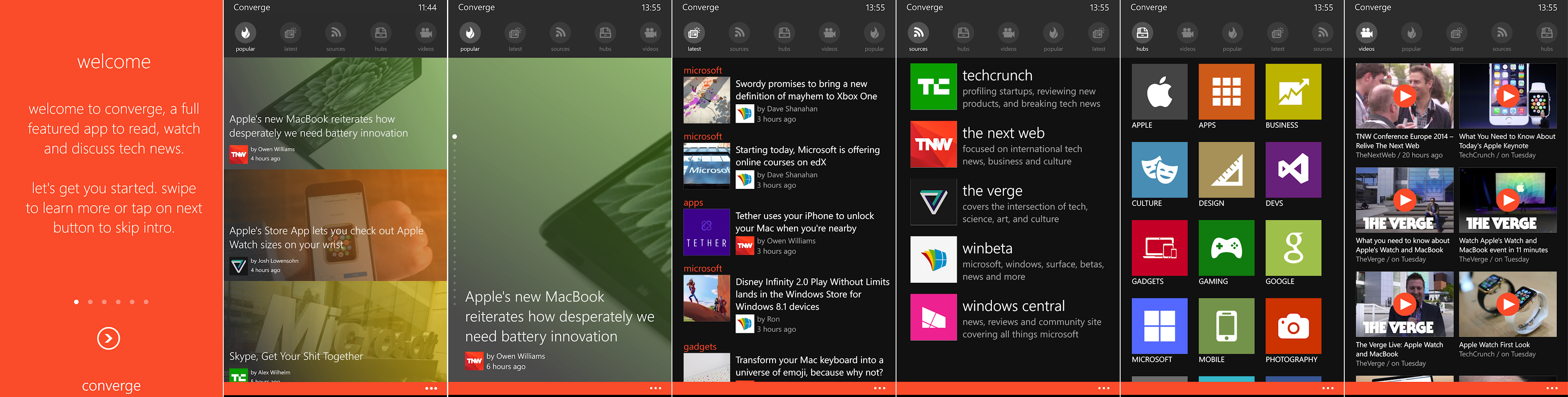
Converge 4.3.1 – Converge is a popular app with a 4.5 star rating. It focuses on Tech news only which makes it less useful for me but it has a very nice UI & includes a Video Hub that display all videos embedded in all the downloaded articles.
The Popular page is the Home page and you can switch between Tile mode shown below as the 2nd screen or Slideshow mode (find this in Settings) which changes to a magazine mode shown below as the 3rd screen.
It doesn’t sync to other devices and also doesn’t have a Windows 8 app, which is a waste, as the potential for this app to be popular as a Universal app on Windows 8 & 10 is definitely great.
Flipboard 2.6 – Flipboard is a social-media driven news aggregator app that’s ported from IOS. The main draw of Flipboard for IOS users was it simulates the page curling and flipping when you switch between articles, akin to flipping the page of a magazine. Alas, this flipping transition was not ported in WP8 thus reducing the “magic.”
The lineage of the app is very Apple-esque. The Windows version is very versatile but UI takes some getting used to. Things like Following which Feed or which Category was scattered all over the Modern app. I have not tried Flipboard on my iPad so I can’t tell if it works the same way there but I felt it could have been better organized. Flipping the page and other navigation is through keyboard left and right cursor keys or the Scroll on your mouse. BUT, there was NO indication on the screen on how that’ll work if you’re not using a touchscreen! Unlike other Modern apps like Microsoft News which has pop-up left/right edge cues, Flipboard for Windows doesn’t have those!
After you spend a few hours sieving through all the hundreds of feeds/website/categories/whatever and Follow the correct Feeds, you’d be very happy as it syncs back to your Flipboard account and that will propagate to all your devices. Unfortunately, there seems to be some issues with my Flipboard for Windows. After I’ve followed some feeds, it doesn’t sync back to my Flipboard account. It will always revert to the default Flipboard feeds & categories.
FlipBoard for WP8 works much better as it syncs perfectly with my Flipboard account and with other devices. However, it overwrites all the categories I’ve selected in FlipBoard for Windows. Now sieving through so many feeds isn’t productive on a small screen so it’s a real bummer that FlipBoard for Windows wasn’t synching properly.
A lot of potential here but it takes too much time to get to the news I want.

Fuse 2.4.0.2 – Fuse is created by legendary Windows Phone developer Rudy Huyn. It is a very functional software with an interesting Film reel layout. Setting up is quite easy but still requires you to sieve through a huge list categories of RSS feeds. After which you can categories it according to your preference.
It is the least polished of the apps in this round-up and lacks important features like sync to cloud and a Universal app for Windows 8/10. The film reel news feed, while functional, is very distracting with huge website name and the perforated separator for time making this part of the UI rather clunky and un-modern.
There’re some nice touches and animations here and there like all of Rudy’s other apps but this app definitely could use more development.

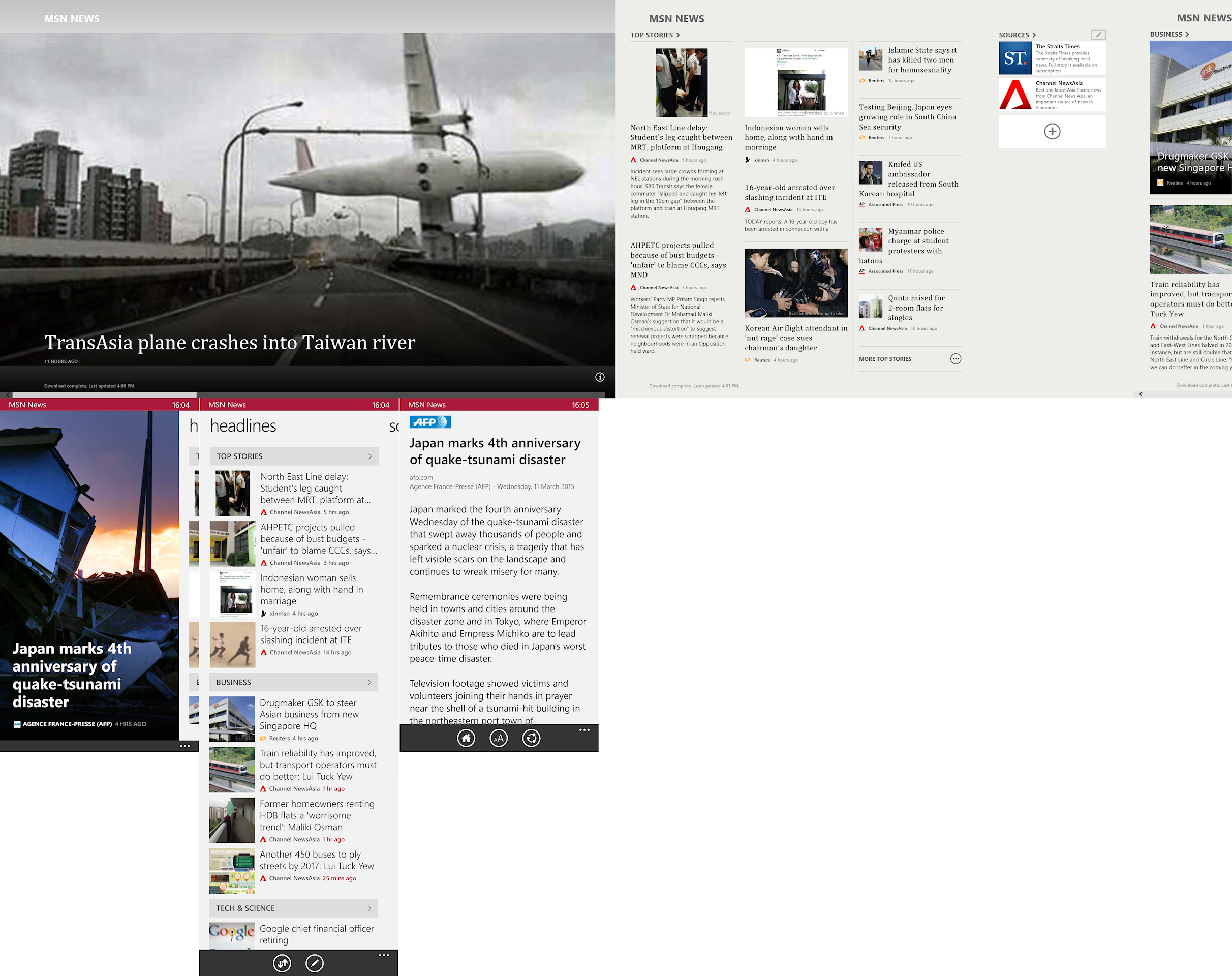
Microsoft News 3.1.4.381 – Microsoft 1st party News app is a showcase of how a Modern app should be like and they have more or less succeeded in that mission. BUT, it’s also the least customizable of all the apps in this comparison. There’re also some nagging bugs like the Featured News showing SUPER OLD NEWS. See the picture below!
The pre-installed list of news sites are very few and doesn’t cover the full spectrum of interests and categories. You could make it show news from all your favourite websites but you’d have to manually key in the address and configure the RSS, which is why I only use MS News to follow Singapore & World news.
For some reasons, MS removed a great feature which allows you to add your own “Topic of interest.” This is moved to Cortana so I suppose MS means for us to use Cortana as our News source?
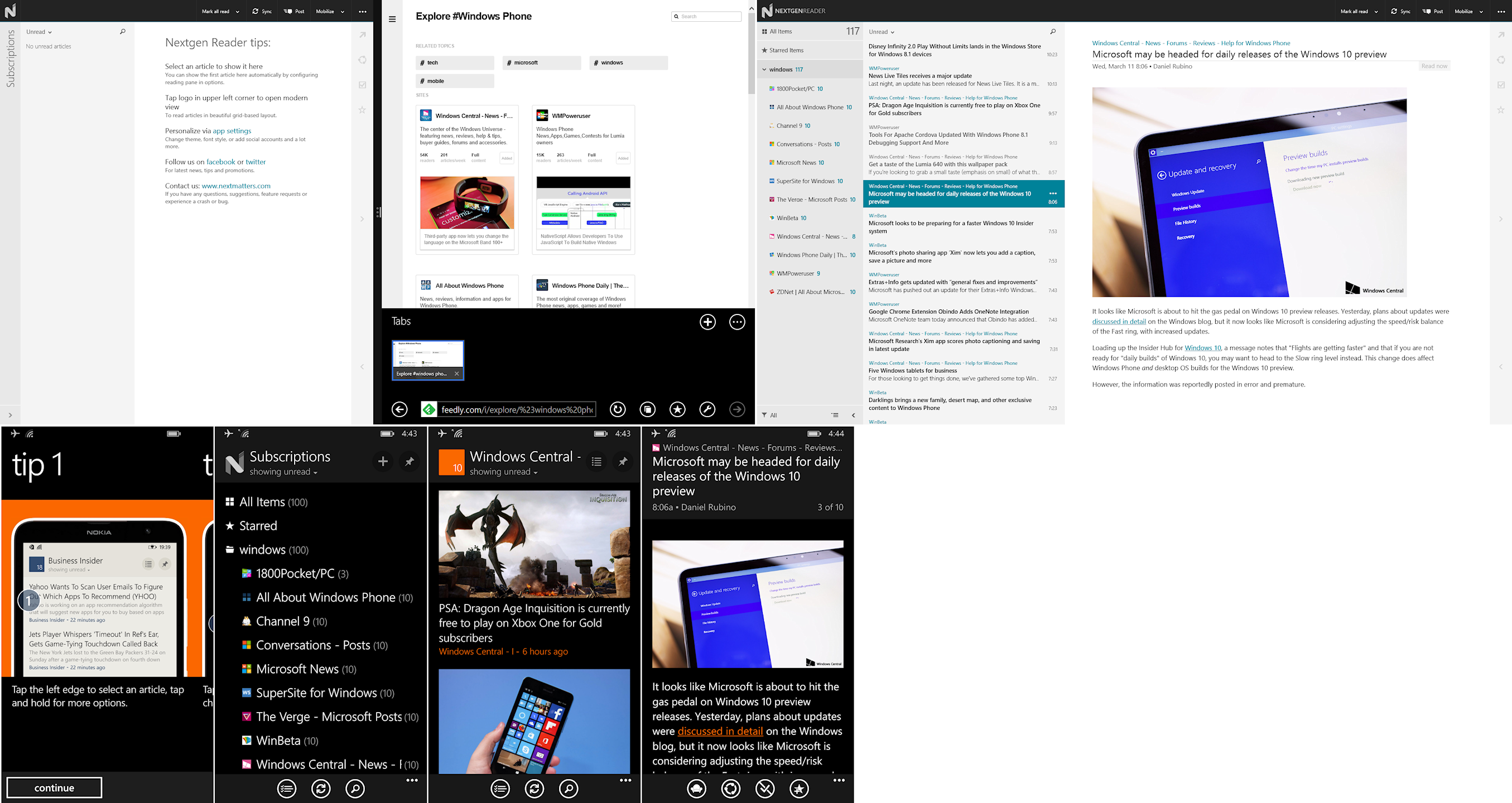
Nextgen Reader 6.3.0.5 – Nextgen Reader is another 4+ star app that has won the praise of many user and reviewers. It is highly functional and the Windows UI is modeled after Outlook Express. It’s also a Universal app which automatically syncs your account between devices.
However, its Achilles’ Heels is the configuration has to happen at the Feedly website. As a client only, it is not possible to configure from the Windows app. Fortunately, the Feedly website is easy to navigate with interest & categories clearly sorted and searchable. Even though the list isn’t pre-selected or curated, it was very easy for me to add the individual websites into the category as major topics of interest are #hashtagged in search. Unlike Flipboard or Fuse, getting organized was super easy & quick, and I don’t feel overwhelmed with the sheer number of websites.
After I’ve added some of the websites that was curated from Weave, I selected a few more which were not in Weave’s list. After that, clicking Sync in the Windows 8 Nextgen Reader immediately displays all my selection from the website. It was super easy!
Opening the app in WP8 was the same, the list and news feeds were all sync and ready to read. I just have to change the view to “Headline with Large Image” and it works almost the same as Weave!
You can add & delete Feeds from within the WP8 app which makes it a bit weird that the Windows app can’t. Did I miss something? WP8 Nextgen Reader has an awesome built-in Twitter sharing engine but if you prefer another app, you can always disable to share via WP8 Shares, or you could have BOTH! This multiplicity of functions is what I’ve come to expect from Desktop software. To see it in mobile apps without clunking up the whole UI is why I love WP8 platform and why I’m growing to like Nextgen Reader more everyday.
I subscribe to a large number of Feeds from multiple sources and it can go into the hundreds within a few hours. I don’t read every article, so I scroll through the list and tap only those I’m interested in. A very useful feature for both Windows & WP8 is the ability to, “Mark above as Read.” This allows me to go through a huge list of articles and simply mark ‘read’ the posts that I’ve scrolled past so I don’t have to go through them again later.
Nextgen Reader is not the prettiest of the bunch but so far, it’s the closest competitor to Weave. After using it for a couple of days I find that there were some areas that can be improved. In the WP8 app, currently in List view, ‘Read’ articles are denoted by a greyed Headline, it would be much clearer if the preview image was greyed as well. And when I go into an article, I have to tap “get full article”, why not set this as the default behavior? This is true for both Windows & WP8.
Magnify News Reader 3.1.7 – Magnify (Beta) is a beautiful app with so much bells and whistles, they had to create a video tutorial that runs the first time you open the app. It is also a Feedly client like NextGen Reader and thus, all my feeds are downloaded and sync to the app immediately after I sign in. If you haven’t create feeds in Feedly website, the app will appear empty and that’s why I scratched my head the first time I installed it months ago. The UI & UX is vastly different from NextGen Reader and users who like 3D animations are in for a treat.
All the transitions have 3D animations, from Home Page to individual section, there’s that flying pages animation. In the Preview page, scrolling up & down also scrolls up and down the Preview images. Once inside the article, a 3D cube effect changes the page instead of a standard scroll.
The app is also packed with tons of features that I use regularly in Weave so this is definitely a strong contender, although I must say that after reading a few articles, I got a headache from all the animations. Fortunately, there’s an ‘Article view’ which switches off the 3D cube effect and just scroll as per normal.
A very important feature that sets it apart from Nextgen Reader is the included Curated lists when you tap the “+” hub. It is a full featured Feed management system which gives users the ability to manage their Feeds completely within the app or use the pre-selected ones in each category or interest. It’s also more powerful than Weave and almost as easy to use as the Feedly website, which is an impressive feat given the limited screen size. Also, when I tap to view an article, Magnify shows the preview while downloading the full (mobilised) article automatically in the background. Kudos to the developers!
Its biggest annoyance is perhaps the lack of the “Mark above as Read” which is so useful in Nextgen Reader. Since the Feeds are not paginated, I have to tap on individual Feeds group if I think I cannot finish all the posts at one go. Within the Article list, you can only Mark all ‘Read’ or ‘Unread’. This can definitely be improved. Personally, the app is a bit too colourful for my liking but if you like your Groups to be colour-coded and fully customizable, you’d love Magnify!

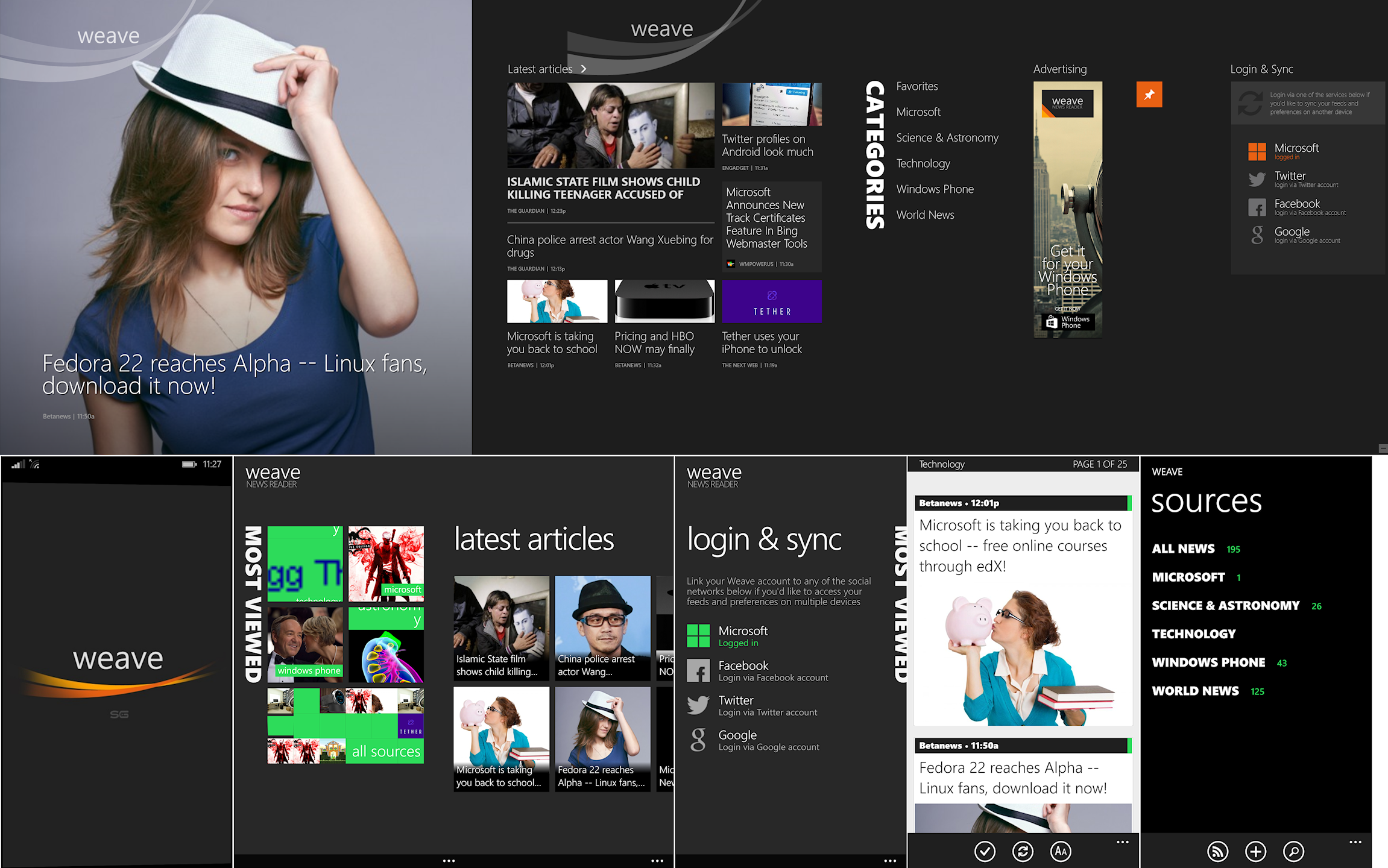
Weave News Reader 8.7.0.2 – Weave News Reader. Much has been written about it. It’s a fantastic news reader for the busy person. It looks fantastic when it first came out. While the look is a bit dated now with Flipboard & Magnify looking awesome, Weave still gets the job done pretty well.
One of its best feature, the Weave (mobiliser) server that Weave News Reader sync to is no longer unique and in fact, can be unstable at times. Certain website also doesn’t get mobilised, including some of my favourite websites, causing Weave to switch to the much slower Web View. Beside mobilising the webpage, the Weave Server also prepares the page for Text-to-Speech, which is a great feature not available in most other apps.
Unfortunately, Weave News Reader has its fair share of bugs like the synchronization of Read/Unread posts can become out-of-sync between devices. When the Weave server was unstable, Weave News Reader would crash or its Live Tile can go haywire. Another very common complain was a stuck Live Tile but that’s less common after WP8.1.
Having said that, Weave still has the best curated list of websites sorted into interest & categories to get newbies up and running quickly. After that, you can opt to sync to your Microsoft, Facebook, Twitter or Google Account. This allows your selected feeds to sync between devices, including read/unread posts so you can continue reading on the go or at home/office.
You can easily customize your preferred website or add more if you so desire although IIRC Feedly isn’t supported. Articles can be easily shared to multiple destinations without any fuss and you can favourite any posts so it stays in your synchronized feed forever, or until Weave server goes dark on 14th March.
Weave has tons and tons of features but somehow doesn’t feel cluttered and is one of the best example of a modern app there is!
Which app is the winner?
Well, after this review, I still prefer Weave but since I have to choose an alternative, my recommendation goes to NextGen Reader. It has the best balance between UX, UI, features & customisations. I’d continue to play with the other apps and update this article with my thoughts as I go along.
To help readers make up their own mind, here’s a table.

Comments are welcome and if you want me to review another app on either Windows or WP8, I’d be happy to do so when I have the time. Remember to like my post & subscribe!
 My Thinking Out Loud!