Reviews

Microsoft Windows Phone 7.8 is here but could have been more!

ImageMy Lumia 800 updated to WP7.8

Nokia delivers!

As promised by Nokia, Windows Phone 7.8 was released this morning & many people are already receiving the notification to update. I didn’t so I had to use the Network cable unplug/disable method to “trick” Microsoft update servers. It worked albeit I had to babysit the entire process since the update came in 3 parts & I had to perform the trick 3 times.

General Impression

If you’ve read my previous article about whether MS is shortchanging WP7 users, you’d see that I concluded the article with we’re not shortchanged unless it’s just the Start Screen & nothing else. Well…

The truth is somewhere in the middle. It’s the Start screen but with not much else…

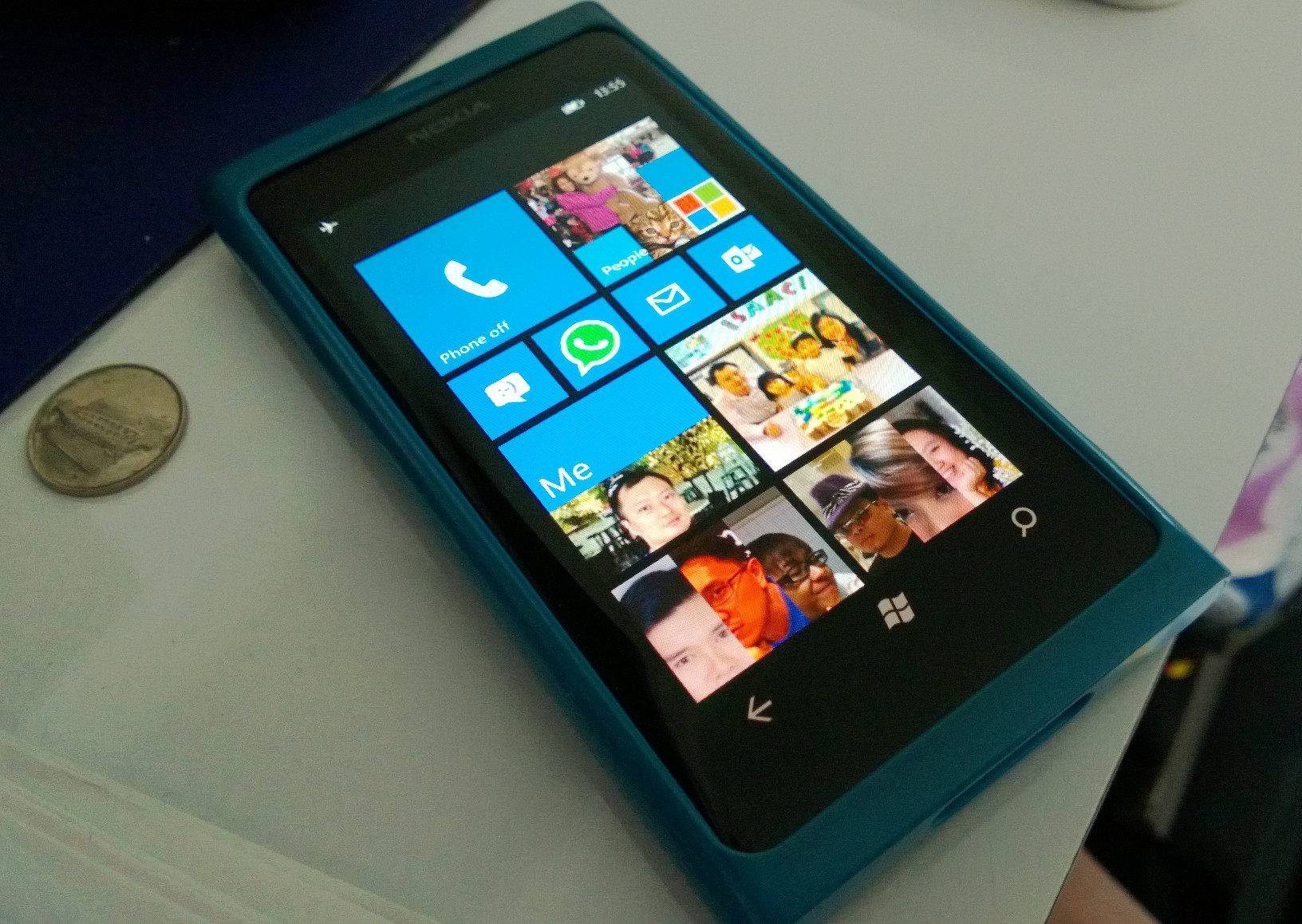
I like it that the Tiles are bigger & support all the new Windows Phone 8 Tile sizes, I also like that the screen refresh rate *seems* to be 60hz making transitions & scrolling smoother.

There’s also the Bing Lock screen that refresh your Lock Screen picture everyday but I very much prefer my Lumia 920 Facebook Lock Screen.

Nokia Bluetooth Share seems to appear in Marketplace after WP7.8 probably due to more Bluetooth profiles being implemented.

Other than that I haven’t found any other differences. MS Windows Phone Team must have dedicated a very small group of developers for so little changes.

Battle for 3rd place

I feel that this is a wasted opportunity especially with the successful launch of Blackberry 10 yesterday. BB10 came out guns blazing & seems to be a more complete platform than when MS launched WP7 in 2010. Bad publicity from a mediocre WP7.8 release will just backfire on the entire WP Eco-system as a whole.

Granted, Windows Phone 8 seems to be pretty successful with tons of compelling features with much polish, and early indications of good sales figure gave WP8 a good head start. But, to gain market share rapidly in 2013, MS & partners must compete with Android on the Flagship to Mid-range with WP8 and Budget to Entry-level with WP7.8, while battling with BB10.

BB10’s 2 new devices Z10 & Q10 seems to be targeted at Mid-range market currently. Having seen it’s feature sets, it’s not a bad start from a technological point of view. It’s GUI & UX is somewhere between Android’s wild west customization & Windows Phone integrated experience. Diehard BB users will no doubt upgrade to BB10.

A strong WP7.8 would show MS is still giving very strong OS support & grab more developers. Positive media coverage will also give buyers sitting on the fence more reason to switch. No doubt WP7.8 IS generating a lot of news but imagine what it’ll be like if MS surprised everybody with a major overhaul. THAT will definitely steal the thunder from BB10 in the months to come. As it stands now, MS share prices dropped 1.44%.

What’s missing?

So what will bring WP7.8 up to present standard based on the limited hardware & dominate in the Budget/Entry-level market? Here are what I think will do it.

1. Kid’s corner
2. Number pasting in dialer
3. Lock screen customization (Including API for developers as well)
4. Screen capture (come on MS, is it so hard?)
5. Backup (In some form like in Zune, Skydrive would be even better but may not be as practical for target market with limited broadband access)

I do hope that MS will upgrade WP7.8 some more soon so that we can see the above missing features in WP7.9.

Conclusion

In conclusion, I’m a bit disappointed WP7.8 didn’t turn out to be more. Maybe Qualcomm has let MS know that Snapdragon S4 will soon be priced like the Snapdragon S2 now. So next year, even Budget WP will be dual-core & can support WP8.

By that time, Lumia 900 users’ contract will be up & it’ll be time for them to move on. Maybe if WP7.9 is good, they’ll consider to stick around for WP8+ or else, MS can expect a mass exodus of users who’re soured by WP7 just like many did with WM6.5.

Here’s hoping…

Solutions

How to be productive in Windows 8

Overview

Microsoft launched Windows 8 to much fanfare on 25th to 26th Oct 2012 worldwide & the reception has been pretty good overall. Steve Ballmer mentioned at the Windows Phone 8 launch that Windows 8 takeup rate was faster than Windows 7 was back in 2009. There are, however, still concerns that it will leave behind a big group of enterprise users who have a problem with the learning curve involve with the Start Screen.

Yes, the Start Menu & Start button are gone & there’s no way to get it back without buying some third-party software, which business will, no doubt, hesitate in spending extra on.

If you’re wondering what made Microsoft make such a major change, read my opinion piece here.

How to be productive in Windows 8 on older PC

Many PCs are still running great or are acceptable. Most of them don’t have a Touchscreen or Pen digitizer. The biggest concern for many users is, can the new interface be used with Keyboard & Mouse without sacrificing productivity? The answer is a resounding YES!

Now, let me qualify that I’m going to teach you how to use WIndows 8 using an average keyboard & mouse, not the new generation of keyboard with Windows 8 keys or the new mice that has Touch surfaces or even Trackpads that mimic a Touchscreen. Just you plain old familiar stuff. You’re welcome to upgrade your keyboard & mouse if you want some of the new features but they’re not necessary. Microsoft has taken care of us.

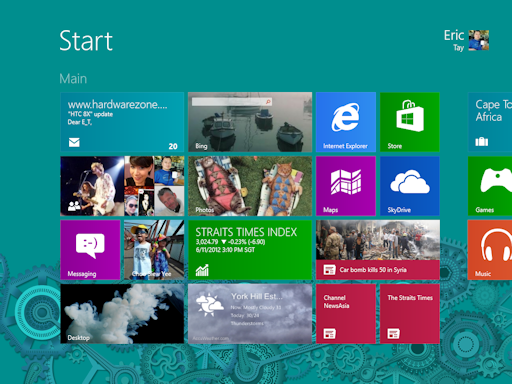
The new Start Screen

Your new playground to drive away the Monday Blues & welcome TGIF!


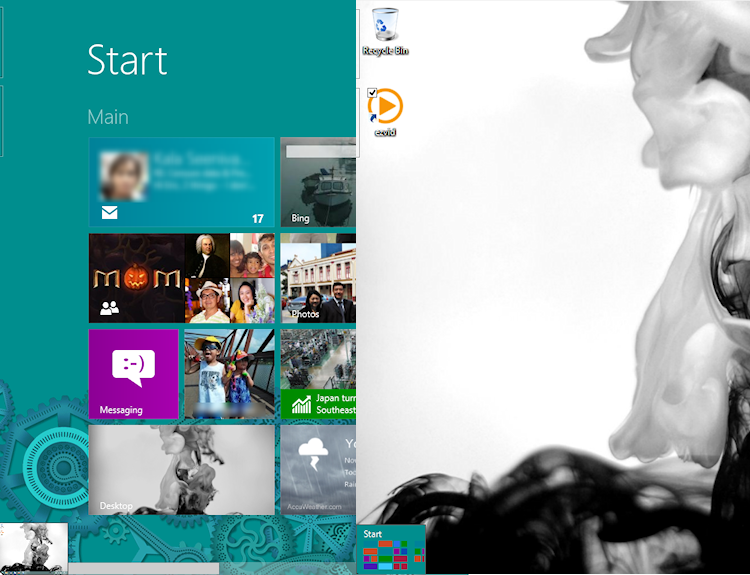
Well as mentioned, Start button & Start menu are gone. In its place is this beautiful, cheerful full screen & scrollable page with tiles arrange in neat grids. The first reaction is the information overload if you’ve configured your Windows 8 to sync with your MSN/Xbox/Hotmail/WP7 account. Next is the shock of not being able to find your favourite software & perhaps Desktop!

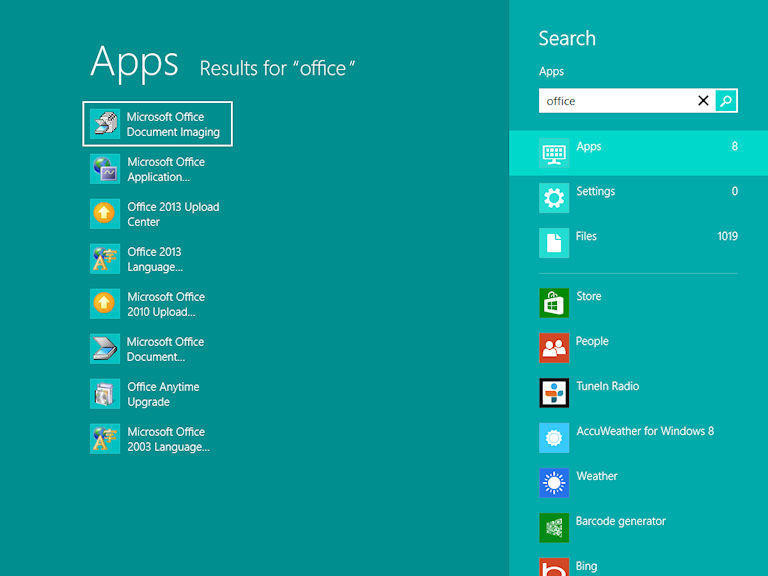
Start Typing on the Start Screen & you get Auto Search!

No worries, let go of the mouse & start typing the name of your software right at the Start Screen. A panel will appear on the right & the result will be shown on the left. You can select your program by using the Up/Down arrow keys & pressing Enter.

By default, Windows 8 will search your keyword under Apps, Settings & Files. This means that you can easily find anything on your App list, Windows settings & even files on your HDD without leaving the Start Screen! You will also notice that beneath the 3 system defaults, there are some apps that you’ve installed. By clicking them, you’re actually asking the App to search your keyword within the App automatically! How convenient is that!

The All Apps screen…

So what if you just want a list of All your apps & programs? No problem! Just right click at the a blank area of the Start Screen & a panel will pop-up from below. You can also press the Context Menu key to bring it up. To the right, you’d see an “All Apps” icon. Click it & all the apps are displayed alphabetically & in groups where applicable.

The Windows Key on your keyboard becomes extremely important in Windows 8. Pressing it always switches you to the Start Screen or between the Start Screen & the Desktop depending on what app is in the foreground.

The Start Screen & All apps list is also the place where you uninstall stuff. No need to open Control Panel!

Charms Bar

More useful for tablets but serves a purpose with keyboard as well

Now you may have heard of the Charms bar which appears from the right. Just move your mouse to any of the right corners to bring it up or press Win+C. This is where you find more shortcuts like the before-mention Search.

The Charms Bar is also where you’d find the Share button. Share allows you to share stuff from one app to another, similar to copy & paste; Windows Icon acts like the Windows key; Devices shows some currently connected peripherals; Settings is where you can change the Settings of the current Metro app or Start Screen.

The Charms Settings Bar is also where you can change Networking, Volume, Brightness, Notifications from Apps, Power & Keyboard language.

Multitasking

Next major change is regarding multi-tasking between different Apps & Software.

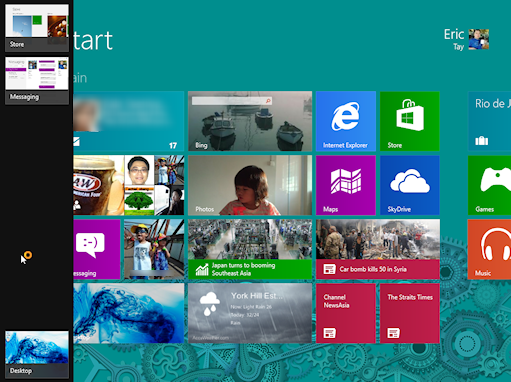
Move your mouse to the top-left corner to bring up the last used Software/App. Slide down to bring out the multitasking screen or press Win + Tab to bring it up on the Left & cycle through opened software & Apps.

Another great & useful way to multi-task

Right-click on the App & you can close it. You can also move the mouse to the top of the App, then drag down to close.

Alt-Esc still works in Desktop by cycling through non-minimized software windows.

Alt-Tab still show Live Preview of your software & Apps in an overlay on top of Desktop or Start Screen.

The invisible Start Button

Preview instead of Start Button

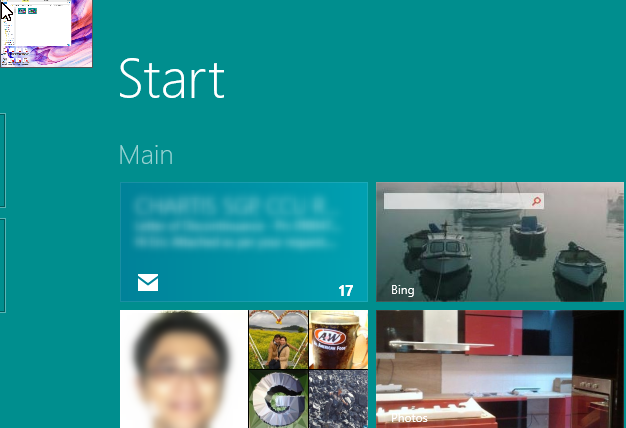
The Start Button may be gone but by hovering your mouse over the bottom-left corner of the screen, a mini Start Screen will appear. Clicking it brings you to the Start Screen, giving the same functionality as the Windows key. Sliding up also brings out the multitasking screen.

Finally! All the Power User functions grouped into a menu!

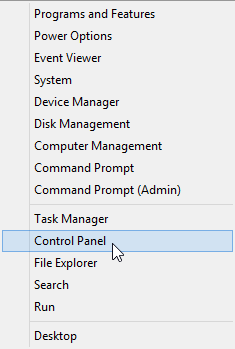
Now the best part is for power user, right-clicking here brings up a context menu with all the administrative tools like Computer Management, Mobility Center & Control Panel, etc. The old Mobility Center shortcut, Win + X now bring up this menu.

Snap!

Shamelessly ripped from Microsoft demo video because my old laptop doesn’t have at least 1366 horizontal pixels

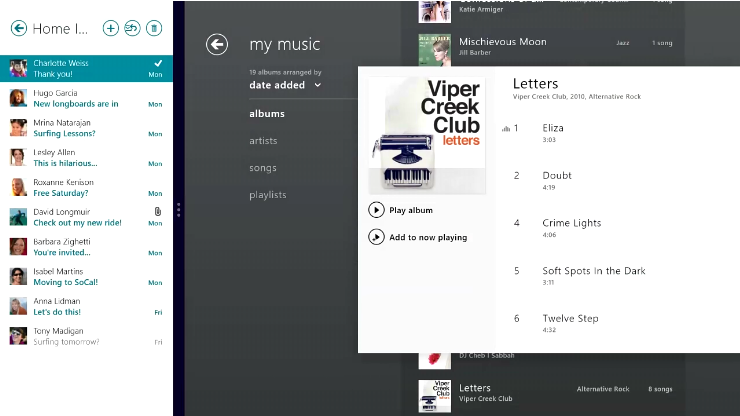
For Windows 8 with a minimum of 1366 horizontal pixel, you can use a new Snap function to “snap” a second app to the edge of the screen to allow multitasking. Just move the mouse to the left corners of the screen, slide down, drag one of the apps out & hover for a while. It should expand & snap to the edge that you hover over.

Ending notes

If you’ve any questions on other problems not listed above or you’d like me to show more features, please leave your comments & I’d try to answer them.

Opinions

Why Microsoft risk alienating 1Billion users by overhauling Windows 8?

Overview

If you’re reading my blog, you’d probably know Microsoft released Windows 8 & RT on 26th Oct 2012 & it looks nothing like any Windows before it. So why is Microsoft willing to risk causing computing mayhem & potential sales by making such a drastic change?

If you’re looking for tips on navigating the new Windows 8 Start Screen, come to my tutorial page to get up to speed.

Windows 8: A bigger more cheerful environment to work & play in

With the rise of Apple iOS & its simple uncluttered design philosophy for iPhones & iPads, consumers have been flocking to buy up every new version even though a typical iPhone/iPad cost as much as a netbook. The smooth & fluid transitions is both appealing to the eyes as well as help to mask the loading time of apps or webpages. iOS works because much attention has been paid to simplicity & emoting the senses.

Microsoft Windows on the other hand has always been about getting the job done in the fastest possible time & letting you get on with your work & personal life. Little effort was made to connect with the user on an emotional level.

Sure, Windows allowed tons of customisation. Windows Vista introduced a prettier shell called Aero with all its transparency but that was all just copying Mac OS X, which does connect to the user on an emotional level with tons of fancy animations.

Much debate has been made about a pretty interface versus getting the job done, and iOS has proven you can have both & feel good about it.

In the past, many Windows XP/Vista users would just revert to the classic shell because it was much faster, especially for older hardware. Microsoft didn’t make it a point to make the XP Luna & Vista Aero shell work faster even though the GPU supports it. Windows 7 changed that but the battle was already lost to OS X with many migrating to the Mac during the mess Vista made.

Many people are already drawing parallels between Vista & Windows 8 but as you’d read later, this isn’t the case at all.

Microsoft knew they screwed up with Vista

Microsoft knew way back then they screwed up big time with Longhorn (the codename for Vista). Some major features like WinFS had to be dropped & unpopular features like UAC introduced.

The minimum requirement was too high for hardware and the (perceived) improvements didn’t justify such a drastic increase in CPU & RAM. However, in the name of better security, these painful changes had to be implemented but it was poorly executed & explained despite the massive Beta programme.

During this whole time, Microsoft had been streamlining their kernel with the MinWin initiative to breakdown the Monolithic NT Kernel into a modified Microkernel platform to allow easier maintainance of code, with emphasis on security.

Windows 7 was the fruit of that labour & for the first time in Microsoft history, you could run Windows on LESS hardware than its predecessor.

One of the design goals of MinWin was to allow Microsoft to scale the NT kernel for less powerful CPU to super-high-power CPU clusters. On the low-power end, mobile was definitely a target ever since Bill Gates introduced the TabletPC in 2001.

Microsoft has been monitoring the situation closely & according to reports, Microsoft had to delay entering the Mobile market due to viruses & other malware targeting Windows. We’re all aware that using Windows without Antivirus & Firewall is suicidal if you’re online. Fortunately, according to this report, Microsoft products now much more secure than before. (Scroll to the bottom for the list).

Having said that, I wouldn’t advise you to uninstall your Antivirus software anytime soon.

Windows 8 Build on Windows 7 security strength

With Windows 8, Microsoft seek to make it even more secure by promoting their curated “Windows Store” to ensure that in future, most software (called App) must be checked by Microsoft before they’re published for download.

Microsoft has also built-in an Antivirus called Defender beside the Firewall that came bundled since XP SP2. Users of the free Security Essentials will feel right at home.

If that didn’t catch the virus, the Windows 8 Remove everything function will basically wipe out everything including your data & any viruses that may be present, thereby returning it to pristine condition.

After using Windows for a year or two in desktop mode, bloat & junk build up & slow Windows down. You can use the new Refresh function to wipe out all these unnecessary stuff without losing your data.

In theory, Apps should not have this problem because they exist in their own sandbox environment with no access to the underlying system except to save files.

Now that Microsoft has solved the most pressing issue with Windows in a mobile & hostile internet environment, the next step was to be competitive with new players like Apple’s iOS & Google’s Android.

Microsoft saw in iOS & Android the same tired icon interface that everyone has been using for the past 20 years. Granted, the resolutions are higher & the colour richer, but it’s still rows of static icons. They decided to adopt a design philosophy that has been extremely successful for public transport & road signs. It was called “Metro” after the subway train services across the world.

Changing for the Better

Many people are afraid of change. A lot of these people are very vocal about staying within their comfort zone. And yet, time & again, it’s change that drive growth, financially, philosophically & functionally.

Steve Jobs is the embodiment of how doing what’s right & needed in a timely fashion is what drives innovation & growth. Unfortunately, his death seems to have diminished the spark Apple had during its bull run.

Microsoft on the other hand, is just coming out of its Antitrust funk, with many good leaders coming out of that difficult time. Many of the current leaders are following Bill Gates aggressive way of doing technology, if not his business practise.

Microsoft knew there has been many calls to fix many of the shortcomings of the Windows interface, both functionally & aesthetically.

The Start Menu becomes a big mess after you install & uninstall many programs & games over time, and there was no obvious way to organise & clean it.

Many of the software are buried in levels of sub-menu & there was no description for what they do. Over time, your desktop will have so much useless files on it, it becomes unmanageable & you can’t find your programs or files anymore.

Vista introduced a Desktop search function but it was slow & clunky. Windows 7’s version was better but not by much.

According to usage data collected from millions of PCs around the world, Microsoft start to see an emerging trend. People like to pin stuff to the Taskbar & Windows 7 Live Preview were GUI hits that receive universal compliments.

On the mobile front, people were responding well to the new interface on the critically acclaimed Zune HD, which flopped commercially due to Apple’s entrenched iPod & iTunes. The final nail came after iPhones became a huge success.

TabletPCs were still doing poorly because as the resolution becomes higher, it becomes increasingly difficult to use Windows software with Touch, which was the next paradigm in user interaction.

So Microsoft started an experiment by putting an enhanced Zune interface on their next smartphone OS called Windows Phone 7.

Windows Phone 7 & Metro

WP7 launched to mixed reviews due to a lack of critical features & lack of apps but reviewers were mostly positive about the Metro interface because it was fresh & completely different from iOS & Android. It was also smooth & fluid even though the hardware was 3 years old.

The design philosophy lends itself well to the underlying message of sharing in a social context, things that happen to you & how you respond back.

It’s a level of emotion that’s both deep & personal because the idea is for you to connect to the people & things that are important to you while at the same time, not linger too long on the phone.

In & out of the phone and get on with life. This philosophy is completely different from iOS & Android, which wants you to stay with the phone for as long as possible, either to make you spend more money on apps & accessories, or to drive ad revenue.

With WP7, Microsoft was attempting to combine both emotion & productivity into a single expression. Currently, WP7 is hampered by inadequate hardware & legacy software since WP7 OS was descended from WinCE which shares many of the architectural features as the obsoleted Windows 95 16-bit operations.

Things like lack of multi-cpu support, cooperative multitasking, unprotected memory management, etc. prevented Microsoft from using the latest hardware available. Fortunately, the user experience was generally positive with high marks of user satisfaction on Amazon & other e-commerce portals.

Unfortunately, the blogging & Tech publications were unforgiving when comparing the hardware, citing WP7 single-core CPU as being obsoleted even though WP7 run smoother, faster & more stable than many dual-core Android phones & even iPhone 4 in some areas. This negativity has heavy leanings on sales staff who read them for information, because they can’t test every device they sell, which in turn result in poor sales because sales people are not willing to push WP7.

Extending WP7 experience to a larger screen

Lessons learnt from WP7 were directly transferred to Windows 8/RT. The pinable & sizeable Live Tiles, the tight integration of the various apps provided by the OS like People, Calender, Messaging, Email all sync to the cloud & popular social services like Facebook, MS Account (including XBox), Skype, LinkedIn & Twitter. The smooth & fluid interface that works well with Touch & Pen, as well as Keyboard & Mouse.

In terms of hardware, Microsoft never expected iPad to become the huge hit it was. So it was a shock when iPad quickly overtook TabletPC as the dominant tablet within less than a year in 2010. This was just after Windows 7 was launched. Something had to be done!

The answer was the Microsoft Surface & Surface Pro. After years of uninspiring hardware design from OEMs, Microsoft decided to build their own Tablet, answering the calls of TabletPC users worldwide. Granted part of the problem was the Intel x86 CPU but I believe more could be done by the OEM.

Now that Intel’s Clovertrail & Ivy Bridge CPUs are low-power but fast enough for Enterprise & Power users respectively, Microsoft can craft a desirable tablet that is actually productive. The next half of the equation is a desirable software platform to use it with.

The new Start Screen as your new “Desktop”

The Start Menu has been a mainstay since Windows 95 introduced it in 1995. That in itself was a big deal when icons & windows were all there was. Third-party shells like Central Point Desktop (part of PC-Tools for Windows 2.0) extended the Windows 3 Program Manager when power-users like me wanted a more extensible Shell with features like lists & Multi-desktops.

As more people started using Windows & more software becomes available, it’s painfully obvious Program Manager isn’t going to be able to keep up & provide the platform Microsoft wanted to take Windows.

It’s the same with Windows 8. With the number of things you can do with a PC + the usage scenario projected for the new Microsoft Surface, they needed a new Shell. But this time, there’s a new wrinkle… Capacitive Multi-Touch screens.

The Touch interface was inherently inaccurate with your finger covering most of the area you’re targeting. The Windows 7 Desktop interface was modified to compensate for this but it was still frustrating if your TabletPC was very small or has very high resolution.

Windows Phone 7 Tile Based Metro Interface neatly solves this problem & by extension, Windows 8’s as well. These Tiles aren’t useless squares and rectangles. They display Live information that are periodically downloaded from the Internet or corporate intranets so only updated information is presented.

The information is also relevant for the App so you don’t get useless information like Ad bombarding you all the time. However, this concept required traditional Windows developers to learn new skills. Something Microsoft has been pushing since WP7.

It is also the new “Desktop” because if you pick up a Windows RT tablet from November 2012 onwards, you can only run Windows Store app. Traditional Windows software cannot run on Windows RT at all except for a few Microsoft native software like Notepad, Paint & Office 2013.

The good news is, whatever App you bought from Windows Store can be installed on up to 5 devices, be it Windows RT or Windows 8 devices. Yes, Microsoft has made it possible to share apps on many different classes of devices irregardless of their CPU!

For developers, this is huge because if you write a Windows App from 2012 onwards, it can run on ARM, Intel & AMD CPUs! For consumers, they can select computing devices without too much consideration to the underlying CPU architecture. This has never happened before in computer history.

(Note that Windows RT is not compatible with every ARM licensee because each of them add certain features which are incompatible with other licensees, unlike Intel/AMD.)

Insurance against a shift in CPU architectural dominance from Intel x86

This is the future that Microsoft is envisioning & is a bet that eventually, all Windows software will become Apps & legacy desktop software is retired, allowing Microsoft to retire the Desktop for Windows RT completely.

Microsoft is also working with ARM directly to support 64-bit operations to allow for larger RAM & Storage for future Windows RT devices even as Intel is continuing to lower their power consumption while providing more processing power to these new generation of CPUs based on “Haswell”.

This is necessary to ensure the survival & proliferation of the Windows platform in general just in case the market moves towards ARM as the dominant CPU instead of Intel x86 since ALL competing tablets on the market currently are running on CPUs based on ARM.

Of course, for Power-users who need the Desktop for the foreseeable future to run information intensive tasks, we have Windows 8 which runs both legacy software & Windows Apps giving us the best of both worlds.

Seeing that Intel & AMD will always have the more powerful CPU/GPU, x86 isn’t likely to disappear anytime soon.

For naysayers of Windows RT, having Windows 8 support Windows Apps will ensure that whatever developer create for Windows 8 will (almost) automatically be available for Window RT creating a real Halo effect & ensure Windows RT will have a large number of Apps in the near future.

Windows App & Windows Store as the new preferred distribution channel

Apple iOS introduced the concept of a centralised location where you can download all your apps. For the user, it is much easier to discover useful software. For Apple, it is a huge revenue generator. For developer, the ability to tap the entire installed base of users was an enticing proposition!

In the Windows world, discovering software usually means a trip to the Search engine, which more often than not, throws up a huge list of webpages, some of which have questionable reputation.

Microsoft had success in courting many developers to the WP7 marketplace & they’re confident developers will do the same for Windows 8 & RT due to the humongous Windows installed base. Steve Ballmer recently announced 4 million Windows 8 Pro licenses bought within 4 days of launch. This number did not include Windows 8 licenses that were pre-installed on hardware already & Microsoft Surface 32GB being sold out everywhere. Not a bad start.

Customising YOUR Start Screen

Usability of the new Start Screen will require a new way of thinking but in terms of getting things done & getting to your software or apps, it’s faster than the Start Menu especially if you use Windows keyboard shortcuts a lot.

Management of the various software is also much faster. You can uninstall anything from the Start Screen. You can pin & unpin Software & Apps you use quickly to the Start Menu. You can Group them together so that you can see at a glance where everything is & if there are any updates on their Live Tiles if they’re Windows 8/RT Apps.

It’s also a full-screen affair so all your personal stuff are up front & ready for you to Touch/Click, creating a deep connection between yourself & your Start Screen. Even your name & Account Picture is displayed prominently on the top-right corner making your Start Screen uniquely yours.

You can change your Desktop wallpaper but the Start Screen background is restricted to specific design. Because the Live Tiles take up over 70% of screen real-estate, you can’t use your photos for the Start Screen’s background nor would you want to anyway.

Beyond the Start Screen

Your Start Screen is also synchronised with the Microsoft cloud called Skydrive, which allows you to have a familiar environment across any devices that you login to with your Microsoft Account. You’ll also automatically have 7GB of online cloud storage which you can easily access from your Windows 8 PC or using a browser on any platform.

Neat touches like Picture Password also adds a layer of personalization not common on other platforms.

The new Search also allow the Search bar to find not just Software, Apps, Settings and Files, but also any items within the Apps & its cached and online data.

For example, if you search for “Paris” & click the Weather App, the App will immediately show all cities named Paris & display their weather.

One of the issues with iOS & Android is you can’t copy & paste complex information between Apps. Windows 8/RT allows an app to share information in a pre-determined fashion, allowing users the flexibility of sharing information, not just to friends, but between Apps as well, negating the need to sync to the cloud & back with another app.

One of the things that most people take for granted is printing. iOS & Android printing is severely limited requiring compatible eco-system. Windows 8 naturally support any printers that ever existed with a Windows driver & Windows RT supports many of these same printers with Microsoft converting more printer class drivers for Windows RT as the platform matures.

Since Windows has the broadest peripheral support, you are insured against a piece of hardware not having a corresponding Windows driver. For Windows RT, driver support will hopefully come when the user base increase.

International support

Windows 8/RT also have much better International support versus Windows 7. You no longer need an “Ultimate” license to change Display language & you can even switch it on the fly!

You’d also get the multi-language IME including secondary touch/pen-based handwriting support free of charge for Windows 8 Pro. This used to be an expensive upgrade to the Ultimate version.

Bilingual people like me can finally use Chinese handwriting to input an unfamiliar Chinese word instead of using the much slower hand-stroke method. I assume this will work for many stroke-based writing like Japanese & Korean as well. Just install the Language Pack!

Conclusion

I think you can tell from my article that I’m pretty impressed with Windows 8 Pro. I’ve already upgraded my Fujitsu T4215 TabletPC & have not encountered any problems so far.

However, this TabletPC is 5 years old & lack a Touchscreen. This isn’t something I can upgrade unlike the CPU, RAM & SSD. So, I’m waiting for Microsoft Surface Pro to be launched next year.

There’re many Windows 8 tablets already launched but so far, only the Lenovo Thinkpad 2 excites me besides the uber-cool Surface Pro. Let’s see how Microsoft price the 64GB Surface Pro. If it’s priced too high, I might just buy my first Lenovo.

Solutions

PerfectDisk 12.5 Service Pack (SP) 5 Build 312

Solutions

Gregory LaMothe's avataractionsystems

Of all the workshops I conduct, my favorite is negotiation.  Today I’ll tell you why, and give you some useful tips to save time and money in your personal life.

We’ll start with this simple premise.  When you study negotiation, there are generally three areas of focus, and I use the acronym TIP to help people remember them:  time, information and power.  Let’s look at all three.

Any time you’re in a negotiation and you have all the time in the world, you’re in the better position.  Example:  you have to sell your house to relocate, having already bought a house in the new location.  Home buyers have all the time in the world to look for a house, but you’re in a hurry as you’re soon to be squeezed for cash.  You’re in the weaker position.

Years ago, American auto-makers and other companies would travel to Japan to negotiate…

View original post 424 more words

Opinions

How Microsoft should market Windows Phone 8

Windows Phone 8 looks like it’s good enough to take on iPhone 5 & Android Phones running Jelly Bean but it means nothing if Microsoft is not able to get it into people’s hands. In order to do that, they need to market, market, market WP8 phones with all their money! Here’s my opinion on how they can approach the market.

MS should do what Apple always does. Emphasize on the strong benefits of the OS. This kind of marketing CAN change people’s perspective. The important thing is not to belittle the competitors, just say we’re better. Emphasize on the BENEFITS (user scenario) as much as possible.

As an example. The #smokebywindowsphone strategy has work to a certain extend but MS should have made a big TV campaign that say that WP7 is single-core, so what? We’re still faster than a Quad-core smartphone (cue Nokia Lumia 800 overshadowing Samsung Galaxy S3 in capturing a FUN or embarrassing moment, then Tag the victim & upload it to Facebook). All done in 10 seconds before the victim even have a chance to stop you.

Then do another Ad that say WP8 has 100,000 apps while others have more than 600,000. So what? Our apps are actually useful & beautiful in bold “Windows 8” style that’s easy on your eyes, (cue HTC 8X’s camera app + CNN + Weave, in app & on Live Tiles, etc. then show Motorola RAZR HD succumb to a virus.)

And most importantly, something like WP7/8 connects you to your most important (anything), then show HTC 8S showing Me Hub, People Hub, Group updates, Picture Hub, Notification & What’s New filtered according to Facebook, Twitter or All. Ends with a tagline with the effect that WP8 helps you run your life, not be overrun by it. Then show Apple rows & columns of icons scrolling aimlessly.

These Ads should be designed to invoke desire & emotion. Make it look fun & easy. Show off the integration & speed, show people are able to get BACK to their important, their lives, their friends & family or their work made easier. No talking in these ad please! The “Really” campaign didn’t work because people don’t get it.

Getting celebrities to show off these phones is another great way to promote the platform. Jessica Alba was recently spotted with a Cyan Nokia Lumia 900. Why not get her to spearhead a North American or even Worldwide campaign? Do it with blitz & glamour like how they sell fashion or cars. It’s about the concept & association, not the product. You want WP8 to look cool when engaging Star power.

Nokia Lumia ads circa 2011-2012 are going in the right direction with everyday people using their phones for important parts of their everyday lives but it’s time to actually show how these features will benefit the average person, which will reduce the comparison with Android & iOS. Currently, most people still don’t “get” Live Tiles & Hubs.

Do mini-ads that emphasis on a particular hub like how Apple like to showcase their improvements in lovely ads even if it’s so minor, like a fifth row on their screen due to the longer form factor. Not a big deal you say? But it means more screen to show stuff & being able to watch movies in letterbox format.

For example, the Me Hub, introduce the individual function like FB Check-in, a central Notification for ALL communications associated with Me, the What’s New page showing what I’ve post on all the different social medias.

Or the People Hub that show all the things you could do with other People’s posts on all the different social medias including traditional calling/VoIP & SMS/IM + a integrated History page that shows you how you’ve interacted with this person all in 1 page.

There’s also the oft-overlooked Picture Hub & for businessmen & students, the Office Hub.

As for OEM specific stuff, things like the OIS camera on the Lumia 920, they should totally reshoot that girl on the bicycle with a Lumia 920 to shut all the critics up & put boldly in the Ad “Shot with Lumia 920” like those Canon DSLR ads. Nevermind if they have to NG 200 times… Then purposely zoom in when they pass by a mirror to show the guy holding the Lumia 920… sorta like giving the middle finger to all doubters. But I recommend a change of venue to one a couple will actually go to for a date, like a park or the beach. Not some dock…

The NFC? Samsung ad showing the SGS3 with the guy proposing to a girl thru glass using NFC to transfer his video proposal. Fantastic idea! MS or Nokia should totally ripoff this idea! Maybe get Samsung to do that with their ATIV S as well but maybe at a fancy restaurant to avoid confusion with the Galaxy S3. After the girl saw the vid, get the guy to flash the ring & the restaurant comes alive with confetti or something. Some good old fashion feel good vibe for the shy guys among us.

Wireless charging? Show a guy playing Angry Bird or a sports game at an Airport lounge with wireless charging built into the table until he misses his flight because his battery never dies. Make it funny, make him grow a beard & long hair with the clock racing in the back… When he finally finishes the game or when someone demolishes the lounge, he’s now in a space-port with spaceships rocketing by…

Make sure these ads are targetted at the correct audience in the correct media. This part, MS got it but they need to do more in each demography they’re targetting.

I could go on & on but end of the day, the ads that people remember are those that emote them & buyers buy based on emotion (with the saleperson being the final push). Or for the Japanese market, something so absurd, people will it remember as well.

I’m getting a sense that people are starting to notice WP, now we just need to swing them to our side of the pendulum.

Lastly, MS & their distribution channels must train the sales-force well enough so they can genuinely excited by the possibilities with WP8. And I’m talking worldwide here.

After Oct 26 2012, if there’re new integration of Windows 8, Windows RT & Xbox 360 with WP8, they should totally emphasize on that integration as well come Oct 29 2012 WP8 launch.

Opinions

Samsung losing patent case is Good for consumers!

So the jury has ruled that Samsung has lost the patent case against Apple.

Apple, as expected, is on the victory march & Samsung has come out with a sourpuss respond that “consumers will be hurt.” Samsung lawyers are obviously misguided.

Firstly, I’m for innovation & being paid for my ideas. I used to develop software with GUI meant for people with zero computer experience. Thus, I do admire iOS simplicity despite the fact that I wouldn’t develop for it. (That’s another story).

I remember a time when Linux advocates are criticising MS OS/software as bloated. Many of these developers probably aren’t programming for ease-of-use. It was extremely tedious to develop a software that is intelligent enough to accept inconsistent user input or to accept errors & NOT crash. It takes a lot of error checking & data shaping at the point of user input & MS software does this very well. It also takes a lot of thought into how the user will interact with the GUI to ensure it’s not annoying to use due to constant error prompts ruining the experience. Having lots of graphics also make software bigger & somewhat slower.

Of course, these days, all these checking are abstracted into the background & developers don’t have to spend time doing human input checking anymore. It’s all automatic in MS & Apple software. Smartphones are also more powerful & have more memory than PCs 15-20 years ago so program size is no longer any issue. But for Google’s software, the GUI is less mature due to its reliant on Open Source Software, where developers are still not as concern about writing software for end-users.

Secondly, the Koreans are very good at copying others’ success stories & make themselves successful. They are also very aggressive when their neck is at stake. Just look at Korean car makers. They are out-competing Japanese car-makers by making cheaper cars with more features which also happen to look nicer (or at least unique.) Granted, the designers of these cars are usually Germans but consumers gain by having cars with near Japanese quality with more features at a lower price!

This will be the likely scenario now that Samsung & other Android phones are found to infringe on the patents that makes iOS unique. Google will have to make Android more unique & eventually, consumers win. Android makers like Samsung, LG, HTC, Motorola will have to improve their customizations, which only means better user experiences for those phone.

Nokia has shown that it’s possible to create a smartphone with a compelling user experience without copying iOS. Apple lawyer even showed a Nokia Lumia at one point as proof, there are good smartphone OS GUI that don’t infringe on any Apple patents.

Let this be a wake-up call to Google to stop ripping off other people’s ideas. It’s ok to copy & improve on the design & value-add to the consumers. Make the new design your own instead of doing a poor job plagiarizing prior art.

Opinions

What Microsoft should bring to Windows Phone 7.8

Introduction

The bloggers & forum goers & tech journalists are still arguing over Microsoft’s announcement of all existing WP7 smartphones only being upgradable to Windows Phone 7.8 with only the new Start Screen as the only addition + that’s the end of the line for the WP7 line. Some have made-up their mind that’s the case, whether they’re fans of Windows Phone or not.

My opinion is more optimistic mixed with being realistic. But this article is not about that argument anymore. I’ve always argued that Microsoft hasn’t shown us ANY consumer features in the coming WP8 & by that line of reasoning, WP7.8.

So let us see where this line of argument takes us…

End of WP7? Maybe not…

According to this post from WPCentral, Senior Product Manager and Windows Phone team member Larry Lieberman has just given some indication that WP7.8 is not all it appears to be, just an additional Start Screen.

Towards the end of this video, Larry was evasive when asked if that’s all developers can expect of WP7.8, a new Start Screen. His words were carefully considered but it seems to indicate there’s more to come for consumers.

Greg Sullivan, Senior Product manager for Windows Phone has also told Pocket-lint, Microsoft has only shown a small portion of the consumer features at WP8 Summit in Jun 2012.

Let’s go back a few months & look at these news.

http://www.intomobile.com/2012/06/14/microsoft-helps-floundering-nokia-lower-prices-and-compete-against-android/

It’s speculated that these low-cost devices will run WP8 but if that’s the case, Microsoft can bring WP8 to all WP7 devices! Wouldn’t it be faster & cheaper to continue WP7.8 on single-core Qualcomm S2? So far, we’re hearing WP8 runs on Snapdragon S4 only.

Greg Sullivan had also confirm what many bloggers have suspected, that MS will not bring WP8 to WP7 due to time & manpower cost. It’s technically possible but it simply wouldn’t make it a great experience on current phones.

If Microsoft maintains WP7 & WP8, they owe it to WP7 users to ensure comparable features

Below is the list of stuff that should appear in WP7.8 that’s not hardware dependent:

  1. Screen capture (It’s possible because it’s already in most Custom ROMs)
  2. Custom sound for Notifications
  3. Support more Bluetooth profile like Contact transfer & file transfer
  4. User information backup/sync to Skydrive. Stuff like APP states (game progress), Message Thread, Video, Music, Podcast
  5. Skype Integration (Change its P2P operations to semi-P2P, super-node reside on servers rather than phones)
  6. Notification Center ala iOS 5 by swiping left or something
  7. A more full featured Network stack (OK, this one may be a stretch)
  8. Maps by Navteq with Nokia Drive
  9. Xbox Music (Everywhere)
  10. SmartGlass (if it doesn’t rely on DirectX)
  11. Graphics equalizer!
  12. IE10 (even if it’s without the Smartscreen feature)
  13. Like/Edit/Delete Comments/Pictures/whatever in Me/People Hub

What wouldn’t make the cut?

  1. Multi-threading (apps running in background)
  2. Integrated Skype (if they don’t get off their butt & re-engineer Skype network or do workaround in the client)
  3. Wallet (it’s only useful with NFC)
  4. DirectX for high performance gaming engine like Havok (Adreno 205 doesn’t cut it)
  5. Full IPv4/IPv6 network stack with VPN, IPSec, etc.

Microsoft will reveal all in the (rumoured) BUILD event coming end July, beginning August October, beginning November when they launch the new SDK for WP8.

What do you think? Comment below!

Opinions

No WP8 upgrade for current WP7 users. Are we being short-changed?

Intro

Microsoft has finally unveiled the Windows Phone 8 platform, codenamed “Apollo” on Wednesday 20th June 2012. WP8 is without question the right direction & Microsoft is also wise to withhold most information on user features in case Google copy from them next week.

Below is the Full summit if you’re interested. For most enthusiasts, the first 35 minutes are the most interesting, the rest are mostly for (ex)programmers like me.

In many forums around the world, users are up-in-arms about not being able to upgrade to WP8. These complainers are mainly recent buyers of the Nokia Lumia 900 & HTC Titan II. So are these complainers right to feel angry? Let’s look at the situation objectively.

Windows 8 Summit is meant for Developers, IT managers & CTO

What many of these people don’t realise is that, the WP8 Summit is meant for developers. It was never meant to announce any new consumer features. Joe clarified this when he started his presentation & many people who watched it didn’t seem to catch that.

Anyway, WP8 finally brings feature parity against iOS 6 & Android 4.0, while enhancing on the strength of the Metro design language. The fact that WP8 promises so much might be the reason recent buyers of WP7.5 phones were unhappy that they will not be able to upgrade to WP8 in roughly 6 months time, less than 1 year into their contract.

But is Microsoft really short-changing current supporters of WP7? Let’s find out.

Other platforms

For Android, it’s been frustrating for buyers of low to mid-end devices because more often that not, these devices are never prioritized for upgrades, if at all. Only Google Nexus-branded devices are consistently getting updates but these updates are almost always very late & buggy at first. (Reminds me of Windows Mobile 6)

For iOS, Apple makes it sound so fantastic that even iPhone 3GS can upgrade to iOS 6. What they fail to mention is, most of new features of iOS 6 are not available on the 3GS & the GUI (on iOS 5.1) is so laggy, only a grandma wouldn’t mind using it. Apple likes to emphasize their user experience, but if that’s the case, they should not allow iOS 5 on the iPhone 3GS!

Why is it like this? Long time PC users will know that as software get more capability, their CPU & memory usage increase. On the PC, you can always install more RAM and/or a faster HDD/SSD. On the phone, this isn’t possible, even if the phone supports microSD.

So with every new release of software, the hardware requirement goes up. Just look at Android & iOS devices. The only exception recently is Windows 8.

New platform features in WP8

Below is a list of new features in WP8 from a developer point-of-view. Note that Microsoft has NOT talk about new user features except for the new Start Screen & Skype Integration.

  1. Windows NT kernel + Full core support similar to Windows RT
  2. Multi-CPU (& likely multi-GPU) support (Both physical & logical cores ala Hyper-threading, CrossFire & SLI)
  3. Same development environment for WP7.5, WP8, Win RT & Win 8
  4. 2 new HD resolutions
  5. Removable microSD support
  6. IE 10
  7. C/C++ support + Middleware support
  8. DirectX 11
  9. NFC
  10. MS Wallet
  11. Navteq integration/replacement of Bing Maps (With offline maps)
  12. Nokia Navigation integration into Maps (Full SatNav replacement, bye bye Garmin)
  13. Full Enterprise security, management, in-house app deployment, & compliance
  14. Sizeable Tiles!!!

Now let’s match these new features & see which one requires hardware that current WP7 phones don’t have.

  1. Windows NT kernel + Core Stacks likely require 300-400MB of RAM to boot up. With current devices, maximum is 512MB of RAM, meaning after Win NT loads, you can’t run many other apps
  2. Multi-CPU – DirectX, IE 10, Enterprise security (encryption) all require Multi-CPU to run well
  3. New resolution of phone screen – Higher PPI on the phone allows more content to be displayed clearly especially for 4″ screens & above
  4. Removable microSD – Expandable storage allow users to upgrade their storage according to needs. Flash memory is not cheap.
  5. NFC – required for MS Wallet & Tap+Share

Without good DirectX support, gaming Middleware wouldn’t work very well. Without Multi-core, IE 10 will lose the browser war. WP7.5 is already very optimised & run faster than Android & iOS 5 on single-core devices. Going forward, Microsoft’s customers like me, are not going to be satisfied if WP8 devices are not faster than Android 4.0 & iOS5 devices!

So what are we left with?

  1. Same development environment
  2. C/C++ support
  3. Navteq powered maps + navigation
  4. Sizeable Tiles

Hey! Wait a minute, this sounds just like Windows Phone 7.8!

When we look at Microsoft’s position in the mobile arena, the length of time they spent doing WP8 (more than 1 year) & the innovations coming out of the new Microsoft, it’s almost inconceivable that they’d try to alienate existing customers, both end-users & OEMs by short-changing us. Losing end-users also gives OEMs less incentive to make smartphones running WP8. All bad bad situations for Microsoft’s already weak position.

Conclusion… Not short-changed!

In conclusion, with some concrete evidences & some extrapolations, I think we’re not short-changed at all & Microsoft hasn’t even announced their consumer features yet. (Although I will get upset if WP7.8 is just the Start Screen upgrade.)

It just doesn’t make sense to offer WP8 to existing users because our hardware simply cannot support the huge amount of stuff in WP8, & Microsoft is not going to sugarcoat it like Apple does. Unfortunately for Microsoft, users of Microsoft products typically identify the hardware more strongly than the software. This is a direct consequence of detaching the software from hardware in order to give consumer more choices.

Apple fans, when they find out Siri doesn’t work on iPhone 4, they go out & buy iPhone 4S almost immediately. Microsoft simply don’t have that kind of brand loyalty especially after their Anti-trust legal battles almost 10 years ago.

So if you own a Lumia 900 or Titan II, don’t sell yet! Wait a few weeks for Microsoft to announce what’s in WP7.8  & WP8 before making a decision whether Microsoft deserve your business!