Health

Worst Haze in Singapore so far…

Update: PSI at Friday 21/06/2013 1PM is 401!!!

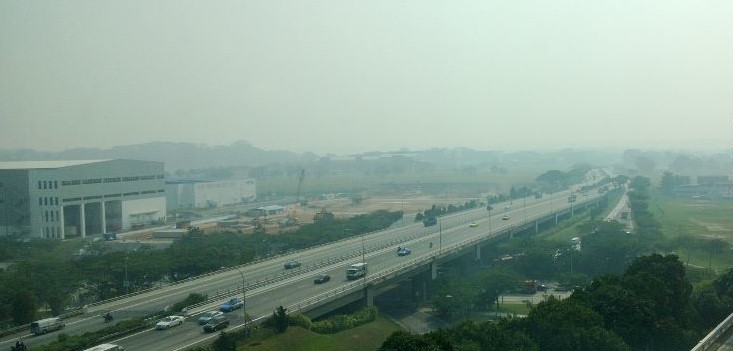
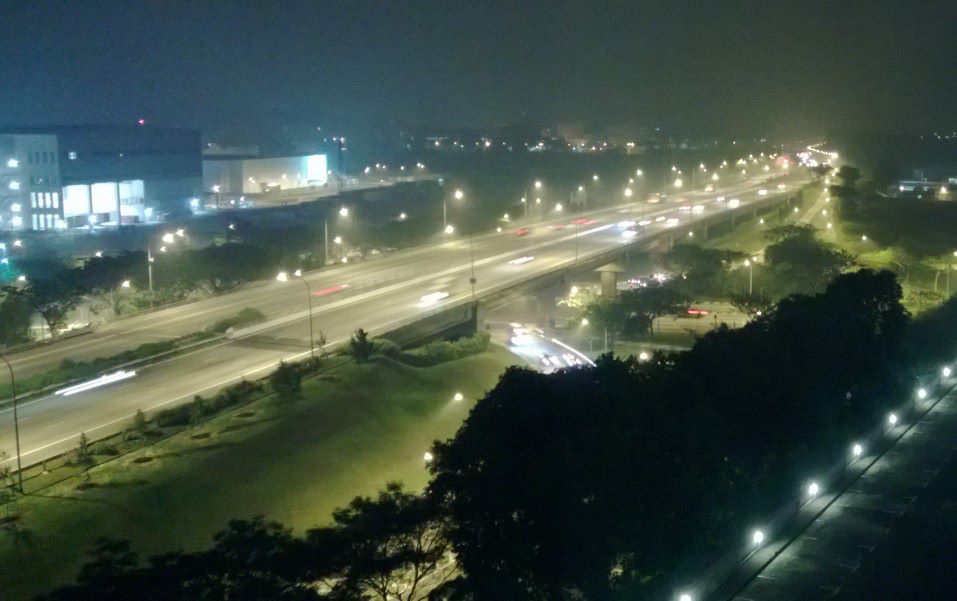
It’s foggier than this image suggest…
NEA PSI webpage, the most watched webpage in Singapore today?

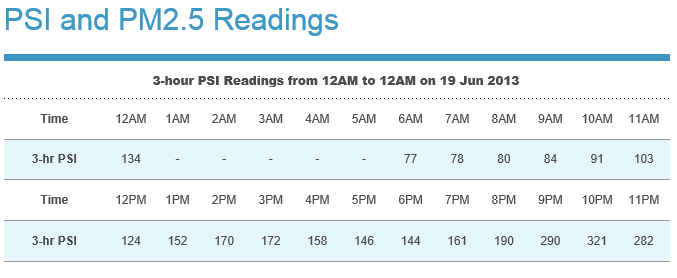
Wow! As of 3PM Singapore time 19/06/2013, the 3-hour PSI reading (based on PM10 particle size) is 172. This is the highest I’ve ever seen in Singapore. Only time I’ve seen worse was in Beijing with PSI equivalent at 300+ with visibility down to <10m. As you can see, the visibility now is still over 1km but RSAF didn’t fly today AFAIK.

Check out this shot outside my window.

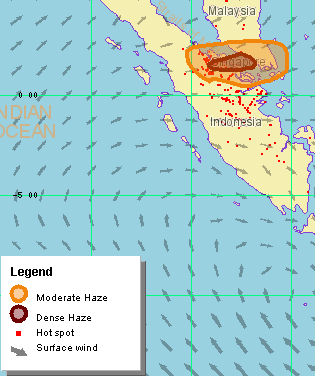
This is a crop from Singapore Met services’ NOAA-18 satellite taken at 8am this morning. Malacca is worst hit from the looks of this image.

suma18d
Satellite image cropped from http://www.weather.gov.sg/wip/c/portal/layout?p_l_id=PUB.1003.656
Yellow area denotes haze

Based on the wind direction, the situation is not expected to improve much over the next few days unless a major downpour put out the fires in Sumatra, like in 1995, where brave Malaysian fire fighters battled futilely to put out the pith fires and are ultimately saved by a massive storm system.

ASMC Haze Map from www.weather.gov.sg
ASMC Haze Map from http://www.weather.gov.sg

Stay indoors with air-con on. If need be, buy some 3M air-con filters from DIY shops & install behind the normal air-con filters. The charcoal ones will even cut the burnt smell. Drink LOTS of fluid & see a doctor if you have allergic reaction!

You can choose those pre-cut ones for standard air-con size or the cheaper uncut ones.

Take care!

Opinions

Creative Technologies, missed opportunities or lost cause?

Ancient History

Update 1 27/2/2014: Thanks to Arthur for new info
Update 2 09/3/2016: New info/insights from FY15 financial report + clearer grammer. I’m still getting regular hits to this old and rushed article! What do you, the reader, hope to learn? Share with me in the comments!

Creative Technologies (CT) became famous for their SoundBlaster soundcards in the 1980s. They were the first company in the world to combine FM Synthesizer (MIDI music) & PCM Codec (Voice/Sound effects) + a MIDI/Game port in a single ISA peripheral card. The all-in-one card was sold at a price that basically undercut the competitions at that time. From my memory, their main competitors were Adlib card (also an ISA card) & Covox Speech Thing, which is an external device that plugs into the parallel (printer) port.

Perhaps more importantly, the driver support was open to all PC & games developers, who started the multimedia revolution. This got a huge kickstart when Microsoft announced plans for the Multimedia PC (MPC) and SoundBlaster was the only card in town to meet those specifications.

From there, enhancements were made rapidly as new components (Integrated Circuits) with new capabilities became available from chip suppliers. CT was also very smart in ensuring new hardware and drivers were 100% backward-compatible so every new generation of soundcards provided an almost irresistible urge for gamers and enthusiast to upgrade! Even if the games at that time didn’t yet support the new features.

There were many competitors from Singapore & abroad but an aggressive marketing campaign + aggressive product roadmap soon see them to the pole position. Needless to say, CT became a darling on NASDAQ & SGX. Every new product launch will see a corresponding spike in share price & a nice dividend payout.

They were doing very well in the Soundcard industry in the 90s, especially with the acquisition of E-MU & then Aureal, which turned their soundcards so powerful, it can be used in industrial applications due to the E-MU DSP. Games were specially written to take advantage of all these 3D positioning sounds as Aureal APIs allow game and multimedia developers to place sound/music at specific spatial locations relative to the listener. Games written for Aureal 3D sounded truly immersive!

For music/video playback, only QSound encoded audio sounded more convincing with distinctive sound playing in and around your head. SRS & CMSS-3D extracted audio cues while stereo audio is streamed so these algorithm only expanded the soundstage and was not suitable for gaming. Aureal 3D was not suitable for music/video playback because you have to tell the algorithm where to place the sound.

DirectSound actually heralded the downfall of CT’s dominance. Microsoft introduced DirectX for multimedia & game developers to standardise on the PC platform. Intel also released reference motherboard designs to OEMs to copy. Microsoft followed up with Direct3D & DirectSound3D which brings arcade level gaming to PCs.

Being in pole position for so long, CT became so big & bureaucratical that they fail to notice the development of inexpensive soundchips being built & integrated into motherboards. Granted these early generation soundchips sounded horrible due to multiple issues like the inability to play & record at the same time + grounding issues on motherboards causing all sorts of noise & interference on the audio output & unstable drivers causing crashes.

CT was still selling SoundBlasters like hotcakes & everyone would switch off the onboard sound. They didn’t realize that after just a few generations of soundchips, these ICs were gaining in capability fast, like the ability to support multiple DirectSound3D streams + 24bit sound output + 108db sound quality + 7.1 sound output.

With each generation being less than 9 months, motherboard makers quickly learnt from their mistakes by isolating the sound circuits with better grounding & by moving high noise data pathways from the North & South Bridge chipsets away from the soundchips.

Windows drivers also got much better with Microsoft support. DirectX was also rapidly improving in capabilities, so much so that in less than 3 years, integrated sound became good enough to compete with SoundBlaster! $0 vs $300+ for a high-end Audigy Gold card or $100+ for a AWE32.

Consumers flocked to the cheaper solution of course, driven not just by price but the irrelevance of the main feature of the AWE-32 & Audigy. That feature is wavetable-synthesized music. With the Audigy, you can get studio quality music from a PC Soundcard that cost $300+ versus a professional card/deck that cost thousands. CT was slow to respond to this trend, probably blindsided by the professional market so it wasn’t till it was too late that CT has integrated Soundblaster in a few select motherboards. But due to cost from integrating the much larger Soundblaster IC, most OEMs didn’t support it. The market just dried up and now the Taiwanese company, Realtek is the undisputed leader.

In the past, if you wanted music in your software or games, the only way was through FM synthesizers. These chips modulated a base frequency into a shape that somewhat resembles real instruments. The best early example is the Nintendo Entertainment System. A simple script called a MIDI file has information on when to play a note and for how long on a selected channel. Every MIDI file has multiple channels each assigned an instrument. When all these channels were played together, a surreal synthesized music is heard. The main advantage of MIDI is these files were extremely small so were favoured due to disk & memory constrains in the past.

With 16-bit CD quality sound becoming the norm, the music portion needed to keep up and Wavetable Synthesis was brought over from the professional audio equipment market. Instead of a frequency modulated waveform being generated, the note from the MIDI file being played actually comes from a pre-recorded sample from a real instrument, called a patch.

At that time, if you wanted the most compatibility for wavetable sound, you had to go for the SoundBlaster AWE-32. But if you wanted the BEST music, you got the Gravis Ultrasound, which also supported a newer even more powerful music scripting format called the MOD(ule). This allowed more reverb, variation, cross-channel mixing, patch manipulation and unlimited patch size.

In the past, Voice & Sound effects were stored in PCM wave format whose file size was huge in comparison to MIDI. As with all inventions, necessity was the main driver of innovation. People wanted to compress CD-quality wave files to make them easier to transport & work with in games & multimedia applications, especially over the new media called the Internet. MP3 was quickly adopted & formed the basis of all music in games, media & movies over the Internet. This basically spelt an end to all synthesized music (both MIDI & MOD) in the consumer realm, rendering all Soundblaster AWE/Audigy & competitor standalone cards overkill. The integrated soundchips with their ability to handle 64 channels of PCM sounds were all that’s needed by consumers. From my memory, the first local casualty of this was Aztech Singapore with their Sound Galaxy range.

Unfortunately, CT’s trouble didn’t end there. A few misstep along the way soon confounded their recover. First was the CD-ROM drive. In the 90s, there were quite a few companies in Singapore making CD-ROM drives. However, once again, cheaper alternatives from overseas (Taiwan mainly) soon convinced consumers to buy those white-box OEM drives instead of the nicely boxed CT drives, which always seem to be a generation slower than these white-box drives. Wearnes Technology was almost wiped out during that episode. CT had a much better balance sheet so they were able to secure Singapore government assistance in the ensuing write-off.

However, the assistance comes with unintended consequences. According to (unverified) insiders of the deal, the agreement was for the Singapore government investment branch, Temasek Holdings, to take over a majority stake of the equitable shares of CT basically nationalizing it, & Sim Wong Hoo in effect lost the company he fought so hard to build. It could be this reason that CT was forced to delist from NASDAQ. The fund was injected through the Economic Development Board of Singapore. Sim Wong Hoo did eventually bought back much of the shares but at great costs.

Now, we all know that government top-down bureaucratic management style doesn’t work in a hi-speed hi-tech industry & that may be what happened to CT, where bottom-line was the overwriting concern rather than taking risks by pumping millions of dollars into R&D to create new products.

CT did have a second-wind with their Zen MP3 players which looked nice, had different form factors/colours, supported all common music formats, can be expanded with external memory & had great software that can transcode one format to another easily. However, Apple came along & stole the thunder with the iPod. CT’s lawsuit against Apple only secured a lifeline, not a victory.

CT’s foray into the 3D graphics card industry also met with poor results. The 3D GPU industry moved at an even faster pace than the soundcard industry. I’m not sure why CT acquired 3Dlabs, but I doubt it’s for their PC potential since CT used nVidia chips before calling it quits.

CT bought Cambridge Soundworks in 1997 with the hopes that the resulting synergy can reinvigorate the company but the gaming surround speakers failed to take off & CT had to sell the division away.

Along the way, they also acquired some gaming peripheral companies which didn’t work out and had to be divested. At this point in the 2000s, CT was completely off my radar and I no longer tracked any of their product range.

In 2009, CT launched a well-publicized but poorly executed (in consumer-space at least) campaign for their (poorly-name) StemCell CPU with “a 100-fold increase in supercomputing power over current technology”. No one understood what the fuss was about. CT’s only real showcase of the technology was an Android powered tablet that few people had a chance to try & a backplane-like cascade of ZMS-05 modules doing 1-teraflop but rendering something rather mundane.

As far as I can tell, the ZMS-05 platform is simply a dual-core ARM-based CPU with 3DLabs GPU component capable of performing 100 concurrent streams. The only difference may be the development platform allows the GPU to handle general programming tasks rather than simply graphical tasks. This may be similar to OpenCL for PC GPU. At that time, this capability was not available for the ARM architecture.

Unfortunately, it was not marketed enough & competitors like Qualcomm (Snapdragon), Samsung (Exynos) & NVidia (Tegra) soon signed up all the tablet OEMs leaving very little for CT.

CT did have a design win when Intel acquired the Ziilabs team for the StemCell architecture in 2012, probably to bolster Intel’s inadequate GPU. I wonder if it was integrated in the new Haswell Core-i CPU thereby giving that CPU the graphics boost it demonstrated in 2011. Haswell chips were eventually released in 2013.

However, for CT, it may not be a good deal because all the best engineering minds from 3DLabs have gone to Intel. Even though CT still owns the IP & Intel is technically licensing it, an IP that doesn’t generate new IP and/or products will be obsoleted in just a few years.

Lastly, CT also have a “Hanz” line of Chinese language hardware platform & software education system but those didn’t really help the bottom-line as shown in the Financial Report 2015.

So what’s left?

Not much actually. They probably ODM certain products, ship the design to China for manufacture & probably rebrand China products for sales elsewhere. Their revenue and R&D spendings have been reducing YoY & they posted a USD $33m loss in FY2015. Their longtime Creative Store at Marina Square is gone. CT is still holding on to USD $99m in cash + cash equivalent down from USD $140m in FY2013.

Where did it go so horribly wrong?

Like the fall of Rome, the collapse did not happen overnight. There must have been many events that lead to disaster. We could point to the failed investments in the past or the lack of direction or even top-level mismanagement. Some may even blame the Singapore Government in meddling in the private section.

I think it’s because CEO Sim Wong Hoo is 61 this year. With no succession plan in place (that I heard of), there’s not likely to be any change in CT’s direction nor will there be a change in their fortune or share prices.

Whatever it is, CT is a pale shade of what it used to be.

Is it a lost cause?

It really depends on whether they have someone to succeed the CEO position and bring fresh perspective & fresh blood into a still pond. It’s currently trading at SGD$1 on SES.

They’re trying to sell a high-end soundbar called X-Fi Sonic Carrier, which admittedly looks good and support Dolby Atmos 15.2 sound but carries a $2800 Pre-order price tag and ships towards the end of 2016. Most sound-bars comes bundled with a mid-range SmartTV so I’m not sure how well this will sell, especially since the launch price is an eye-watering $7000! I believe I can get an LG 50+” OLED UHD SmartTV with sound-bar + sub-woofer for that price!

Is Creative trying to do high-end audiophile market like Bang & Olufsen?

What can they do now?

In 2013, I thought AV Receivers may be worth investing in. I don’t think so anymore, what with most young people abandoning huge TV for huge phones with hundreds dollar headphones. For older folks who still prefer huge TVs, the AV Receivers & box speakers are replaced with a SmartTV coupled to a multi-directional sound-bar with a powerful sub-woofer.

The only gadget trends that’s big right now, with sustained interest for the next 3 years, is Virtual and Augmented Reality (VR/AR) goggles and Internet of Things (IoT.)

I doubt they have the engineering talent left for VR/AR, so maybe CT can start with small IoT projects based off ZMS-05?

They have a lot of great IP which they seem unable to tap. Soundcards (both PCI-e & USB) are essentially dead. With ARM CPU makers integrating DSPs inside their SoC, the DSP cores from E-MU are no longer special.

Without an aggressive marketing strategy like Beats (Apple) or Sonos, I’m not sure how much the Sonic Carrier can add to the bottom-line, even if the sound is awesome. CT really needs to find a niche where they can sell/bundle truckloads of these sound-bars. Maybe small auditoriums or lecture halls?

With that in mind, I have always wonder why CT never went into the AV Receiver market. That’s a market that people are willing to spend on great sound & video, including speakers!

The 3DLabs GPU can be put to great use by upscaling lower res video source from RCA or Component and outputting through HDMI 1.4 for HDTV. The streaming engine can easily be programmed to do deblocking, de-interlacing, Motion interpolation & sharpening of digital video, or 3D-comb filtering, smoothing of TV & other analog signals. Then to top it all off, perform a 3D-conversion!

For Audio, just couple that ZMS-05 module with a ton of balanced Class-AB OP-AMPs and they’re good to go!

The Android OS can be used for onscreen navigation with integrated apps for things like YouTube, Vimeo, Netflicks etc., similar to media boxes from Western Digital & A.C. Ryan.

Conclusion

As a Singaporean, it’s sad to see CT fall from grace but at least they’re still around. I hope someone takes over CT or let CEO Sim Wong Hoo retire from daily running. CT definitely needs a direction so they can recover soon before the cash runs out.

Reviews

Review: Nokia Lumia 920

Overview

This is a detailed review of the Nokia flagship Lumia 920 after using it for half a year. I’d cover as much as I can without too much commentary.

Summary: (still in progress)

Pros:

  • Fast
  • Good battery life
  • Easy to use
  • Great screen
  • Great camera
  • Nokia exclusive apps
  • 29GB available for user
  • Solid build quality
  • Qi Wireless charging

Cons:

  • Heavy & large for some
  • No MicroSD
  • Audio output below par

Issues:

  • Top apps like Instagram not available, Skype not integrated yet
  • NFC for payment only available in very limited markets (Singapore – coming soon)
  • No way to move Apps settings & data from between phones
  • Not all WP7 apps are compatible with WP8 despite MS claims
  • Accidental touching of 3 buttons still bring you out of app

Nitpicks:

  • 3 buttons glows brightly at night, distracting

The 2012 flagship

2013 saw the launch of more than 5 Lumias from Nokia & that is a good thing to target low & high-end markets. Mid-end still belongs to Android. Still, the Lumia 920 holds it own against recent flagships like Lumia 925 & 928. Then there’s the HTC One & Samsung Galaxy S4.

I’m in the group of users who prefer a more handy phone in the 3.5-4″ screen size. However, all these new phones are above 4″ in screen size so I chose the 4.5″ Lumia 920.

Having a bigger screen means you can put a bigger battery behind as shown by the fantastic battery life of 7″ & 10″ tablets. Anything below 4″ wouldn’t allow anything more than a 1500mah battery without undue thickness.

The Lumia 920 is the FIRST mobile phone to have an Optical Image Stabilization system or “floating lens” as Nokia calls it. This technology allows the sensor to continue to capture light even though your hand & body is not steady. The main benefactor is night time. The system is superior to digitally stabilized images as those tend to be soft with a corresponding loss of detail. Unfortunately, OIS doesn’t seem to kick in during subject in shade or under overcast sky. Those image still experience camera shake. This is something Nokia should fix by improving the sensor driver to take faster shutter speed like 1/1000 or faster.

After using the Lumia 920 for 6 months, I found it to be really big but not heavy. It’s thinner than the L800 with case & it doesn’t weigh down my pants. So I’m comfortable with the weight but I can’t reach the very top parts of the screen without shifting it in my hand. This is a bit precarious as the white glossy one that I bought can be very slippery, especially after it’s cleaned.

The battery is a monster! This thing can easily last me a whole day. It lasted me 6+ hours of continuous usage on WiFi on my first charge! 2nd day, with normal usage, it lasted 13 hours on my second charge. Since Lithium batteries have controllers that control the charging/discharging, the cells need to be calibrated. The best way to do this is to use the phone until the critical battery warning comes up, then charge continually till 100%. You only need about 2 cycles to be good to go.

The Lumia 920 has a Peta-band 4G radio so it should work in all markets with LTE. M1 4G is super fast currently & my entire contact list (1000+) & calendar was synced completely soon after I step out of M1 Tampines Mall!

Windows Phone 8 is based on the mature NT microkernel that has proven itself in Windows 7 & 8. As such, preemptive multithreading on multi-core CPU is no stranger to WP8. Any app that fires Async threads works super fast, like the Supertube youtube downloader function. It was very slow on my L800 due probably to the single-core & Windows Phone 7 inadequacy. Even our local Xin Video app is also super fast thanks to WP8 & the dual-core Qualcomm Snapdragon S4.

The IPS screen is fast but the colour is not as beautiful or black as the AMOLED on the L800. (However, after 1.5 years, the Lumia 800’s AMOLED is starting to yellow.) After Portico update, the screen refresh is noticeably faster than the Lumia 800’s. Viewing angle is also a lot poorer as per LCD screens. That said, the screen is definitely brighter on Hi-boosted (under direct sunlight) but optimum viewing angle is only 30degrees. Colour is more “natural” but I’m spoilt by the L800 & my Samsung LED TV colour gamut.

However, because the pixel density on the L920 is much higher than the L800, surfing web & reading is better especially for people who are annoyed by the L800’s Pentile pixel arrangement.

The Lumia 920 is also the first smartphone to use the new Super sensitive capacitive screen from Synaptic. It allows your finger to still control the screen when wearing thin gloves or using metal objects. Since I’m not using it with gloves, I switched display+touch to Normal. Unfortunately, it’s so sensitive, it can get activated in my pocket occasionally.

IE10 is super fast although it’s barebone. I switched the icon to Tabs so it’s a lot easier to switch tabs & close pages I don’t use. Note that some webpages can be active in the background & drain battery.

One of the best thing about WP8 is, OEM updates for Apps, Settings & Lens are delivered OTA through the Store! This means there is no more Telco interference, allowing a timely update of critical bugs affecting the smartphone. Sounds great in theory but realistically, important updates are still slow to reach users. More later…

The Lumia 920 finally comes with a 7-band Graphics Equalizer function, which is great! But this only works for the Line-out. Besides the EQ, it also comes with Dolby Mobile which should come in handy for watching movies. However, I’m not a fan of Dolby Mobile because it makes music sound compressed. I prefer SRS compared to Dolby Mobile or nothing at all when using good headphones. My favourite is still QSound because of its ability to create a 3D soundstage.

On the topic on sound, the Lumia 920 Line-out is definitely not Audiophile quality. I tested the Lumia 920 with my Monster Purity headphone. It’s quite obvious that the stereo separation is not there as mentioned in reviews due to Far-end Crosstalk. SNR is still ok. The instruments are still quite distinct (not distorted much) & not as bad as the review make it sound but some distortion can still be heard on louder music with many frequencies. Of course, hearing is subjective so you should bring your own headphones if you’re an audiophile.

WP8 is great but the FB integration can be enhanced further by allowing Delete & Edit for comments & Posts. Rooms only works with another WP8 unfortunately.

The Camera app can really use more control. It’s a step backwards from L800. That said the quality is very impressive. Most of the stuff that are “not on par” can be easily solved in Windows Photo Gallery (part of Windows Essential 2013), which I really recommend for anyone who’s using their WP for photography. It’s so powerful, yet easy to use! & no matter how good your camera, you will almost always need to edit a bit, be it Photoshop or Instagram.

If you integrate Live Photo Gallery with Photosynth & Image Composite Editor in Win7/8, it’s even more powerful. The Windows Movie Maker on Win8 can even do digital video stabilization if the L920 OIS is not enough.

The speakers are not loud enough for notification/speakerphone but too loud for music. MS still need to do some more work but at least the Volume doesn’t suddenly change when notification comes in.

GPS is fast to lock even under some shelter. (Nokia) Here Drive+ Beta is fantastic in Singapore. Malaysia still need a lot of work. LEGOLAND & Hello Kitty at Puteri Harbour is still not in the map. Here Map now features Indoor maps for many shopping malls + now includes LiveSight which improves your situation awareness when walking, especially in cities. Here City Lens is also becoming more useful & very soon may be integrated into Here Maps.

Live Tiles from WP7 apps like My Stocks are still using low res so it’s a bit blurred from scaling 200% but that should be solved with an upgrade.

Whatsapp 2.9.3 is largely stable with most features enabled but we’ll like to see the end of the Audio streaming being used for background transfers. That will save a lot of power. Viber is here but still buggy. Skype is stable & contacts are integrated into the People Hub but it still use its own dialer instead of the native one. Maybe that will come in WP8.1?

After 6 months, I’ve managed to scratch the Gorilla Glass, there’re micro-scratches on the white polycarbonate body & there’s a lot of dust in the Front-facing camera & proximity sensor. This caused the infamous “screen blacken when in a call” problem which prevented people from even hanging up a call!

Fortunately, firmware 1308 solved it but not before making a lot of users wait very long or had to take their phone in for a 2 day repair. These showstopper firmware updates should be pushed out IMMEDIATELY after Nokia QC has approved it, instead of waiting for Telco’s approval again.

Final thoughts

Even with the launch of so many new phones, I’m still going to keep the Lumia 920 as my main phone. Let’s see whether the rumoured 41megapixel Nokia EOS will sway me next month.

Opinions

Has Star Trek’s Khan Noonien Singh been “whitewashed”?

I have a similar train of thoughts.

Cumberbatch is a fine menacing villain but if they want white (many North Indian men are light skinned), I’d rather they cast Tarkan.

Rupinder Mohan Singh's avatar

When I was a child, the mere singular mention of the word “Sikh” on a television show only strengthened my bond with a science fiction franchise that I maintained through its incarnations in film and television for decades.

In 1967, the science fiction television show Star Trek introduced a new character named Khan Noonien Singh, who, according to Wikipedia, is “a genetically engineered superhuman from India who once controlled more than a quarter of the Earth during the Eugenics Wars of the 1990s.” This unusually named character — with a Muslim surname as his first name and a Sikh surname —  was identified by a historian during the episode as “probably” a Sikh man from northern India:

Other than his darker skin and last name, the only other evidence of this character’s ethnic origin that is presented to the audience to support the historian’s conclusion is a watercolor painting…

View original post 529 more words

Opinions

Why Microsoft shouldn’t release Office for other platforms

Updated (16/06/2013) – Scroll down for update

Overview

Yes, the general buzz among the press & some analyst is that Microsoft should release their Office suite for Android & iOS because it could make them an additional USD2.5 billion a year of revenue. PC is in decline with sharp YoY reduction in shipment & Windows will soon be irrelevant.

I disagree on all these points because I think the short-term gain will actually hurt the overall Microsoft eco-system & is a bad business decision all round. Wintel is in a transition of shifting to full-mobile with Microsoft betting on Windows 8, RT & WP8 and Intel betting on going low-power with minimal performance increase with Haswell & Bay Trail CPUs.

The world economy is also slowing down & more people are upgrading their current PCs than buying new ones because for the 2nd time in history, Windows 8 can run on lesser hardware than Windows 7, just like Windows 7 can run on lesser hardware then Windows Vista.

I’ve been upgrading my PC for more than 10 years with a motherboard/CPU/RAM change every 3-4 years & other peripherals as and when my PC games requires.

So why do I disagree with these analyst? Maybe because of hindsight…

Time for some history lesson

In 1996, Palm Pilot was launched as a simple organizer with a touchscreen + handwriting input. It was a hit very quickly due to its simplicity, small size & light weight, and it soon replaced many paper organizer. The PDA moniker was born.

Microsoft quickly realize that there was demand for a mobile version of Windows on small touchscreen devices & soon launched Pocket PC in 2000. Many professional soon realize the power of having Windows in the pocket. Unfortunately, it wasn’t as easy to use & it’s also impossible to use without a stylus so initial marketshare wasn’t very high.

Palm very quickly updated their OS capabilities & greatly improved the hardware on a yearly basis & very soon, they’re the dominant smart devices on the market. However, when the phone & Internet was introduced into the hardware, Palm started to struggle against more general-purpose operating systems like PocketPC & Symbian.

As the PDA & mobile phone converged allowing the convenience of wireless Internet access through GPRS data connectivity, Microsoft quickly secured many vendors to make Windows Mobile & Windows Mobile Phones & opened their development tools for free to encourage developers to make apps for it.

This resulted in some of the best apps coming to Windows Mobile first or exclusively. This on top of the capability of the OS being able to run on very underpowered ARM CPU of the time soon saw Windows Mobile surpass Palm as the dominant platform.

*Symbian is more of a smarter feature phone than general-purpose smartphone that we recognize today so I don’t regard Symbian as a true smartphone until late 2000 when it was too late*

One of the reasons is MS Office Mobile + the huge amount of free apps + some very high quality paid apps. For serious smartphone users of the day, the only platform to consider was Windows Mobile. It’s also well-known that many Palm users “graduated” to Windows Mobile as they found Palm too restrictive.

Unfortunately, Microsoft didn’t take iOS & Android seriously enough & Windows Mobile 6 was not a big change from Windows Mobile 5 resulting in 2 years of stalled development & lost of the market.

Current situation

So it’s well-known that Microsoft is trying to win back marketshare & mineshare with Windows RT, Windows Phone & Surface devices.

Many professionals have tried iPad & Android tablets for work & many are feeding back that these touch-devices should have many features that Windows 8 & RT already have for years like Windowing, robust Networking stack with Enterprise level encryption support for Active Directory, device management & Microsoft Office.

In fact, many professionals & students who are more savvy are putting aside their iPads & Android tablets for the new Microsoft Surface & Surface Pro because these are viable tablets AND laptop replacement devices that runs Microsoft Office!

One of my clients just picked up his Surface RT in Singapore soon after launch because after years of iPad & Android tablets, he hasn’t found a suitable replacement for Microsoft Office which he needed for work. He said that he can finally sell his iPad & Android tablet.

Besides the Microsoft Surface devices, there’re also pretty decent hybrids like the Lenovo Thinkpad 2, HP Envy X2, Acer Iconia W510/700 & Samsung ATIV Smart PC. If you like exotic flavours, there are the Asus Taichi & Dell Yoga to consider as well.

These devices running Windows 8 & to some extent Windows RT can already do more than iPads & Android tablets because they’re full OS & not stripped-down mobile OS. So in terms of entertainment, Windows tablets is already well covered. You can run VLC player or Media Player Classic which can play almost all known audio & video format & connect it to your Full HD TV for large screen goodness. Since there’s an HDMI connector in every Win 8/RT tablet, you can connect to your AV Receiver & replace your media boxes like WDTV & A.C. Ryan.

At the same time, you can get work done because these devices all support Microsoft Office. Windows RT even bundles it for free with the exception of Outlook.

The future

So we can see that Windows is intricately tied to Office & vice versa. Microsoft is trying to secure Windows future by going “Metro” or “Modern” or the Tile thing that flips all the time. It looks daunting & different and people are scared of change but trust me… It’s the right way forward. Icons are so 90s & Widgets can consume battery like crazy.

This means that for Microsoft to succeed in the future, Windows must succeed & for that to happen, people mindset must be change & this education/perception takes time. Once people have accepted & embraced Metro, Microsoft can think about releasing Office for other platforms, or not…

If Microsoft were to release Office for other platforms now, they would basically be shooting both feet off Windows 8/RT proverbial legs. This is similar to the situation now with Windows Phone 8.

Microsoft should strengthen WP8 by releasing more first-party Xbox games like Halo. They should also have released 1st-party apps like the fantastic Photosynth on WP first, instead of iOS. And don’t even get me started on Skype. After almost 1 year, the dream of free video calls or VoIP just like a normal phone call hasn’t been fulfilled. Skype should already be integrated into WP People & Message Hub by now!

Let’s hope Windows Blue brings all these together & don’t let Office leave the family. There’s no turning back once MS Office is outside Windows. It’s as good as losing control of your best property.

Update 1

On 14/6/2013, Microsoft announced Office Mobile for iPhone, which is very similar to what Windows Mobile had since 2003 and Windows Phone since 2010. You need an active Office 365 account to use Office for iOS and yes, editing is possible but clumsy on a small screen (same problem in Windows Mobile & Windows Phone). Office for iPad is still not available, which is a smart move.

I think Microsoft did the right thing. On one hand, they’ve shown that Office for iOS is 100% ready, to appease pesky institutional investors, but at the same time, they aren’t giving Office away (yet) to the iPad to solidify Apple’s growing foothold in the Enterprise market.

Microsoft have the responsibility to ensure that traditional PC ecosystem players from software houses & hardware OEM have figured out how to transition to a purely mobile PC platform before they allow Office to move to other platform (if ever, hopefully never.)

Solutions

All about Air Conditioning

OK, maybe not ALL about it since I’m only talking about the cooling part. In this post, I’m just going to talk about how to choose an air-conditioner and how to maximize its usage while minimizing energy consumption.

There are a few things that affect how cold aircon feel so take note of these points when buying your next air-con.

1. Blower speed – The higher the better to circulate the air & draw out the heat & humidity. Setting your blower speed to AUTO is the best. When you first switch on the aircon, the blower will be high but as the temperature approach the set temperature, the blower will slow down. If you use a fan to circulate the air, it’ll work even better! But after the walls & furniture cool down, the fan should be switched off because fan/blower noise is irritating & distracting especially when watching a movie.

* Remember, the aircon will cool the walls/floor/ceiling first due to larger surface area.

2. Temperature (inside the room, outside the compressor) – Inside the room, depends on what you’re cooling. If you always have party with many people + you have a big amplifier, set lower (see heat capacity). The thermostat will try to increase cooling power (for inverter) and turn the blower on ‘high’ longer. I set mine to 27’C when watching a movie on my home theatre & it’s cool enough if the blower is directed at the sofa.

Outside the compressor, if the weather is really hot, the compressor need to turn on the fan higher to exchange heat more efficiently and this increases power consumption. My compressor is facing the evening sun so I got 2 compressors that can handle 100% of the BTU load.

3. Humidity – this is the reason we feel stuffy, high humidity reduces our skin ability to cool down from evaporation and makes our lungs work harder to extract oxygen from the air. A good aircon can extract an insane amount of water from the air. My aircon can probably fill a bucket in an hour.

4. Direction of flow – self-explanatory. Want to feel COLD NOW? Stand in front of the aircon blower. Ladies should stand aside to avoid the cold air and dry skin.

5. Blower heat capacity (also compressor wattage for multi-split) – calculate the amount of heat (in BTU) that you expect the blower to extract. This depends on room volume. Budget in extra 10% in Singapore for hi-res HDB/Condo, or 20% if there’re many windows. Budget in 30% if you always have parties. People generate a huge amount of heat.

For compressor, it depends on how many blowers you have. With 3 blowers or more, always go for inverter. I used to have a non-invertor System3 for my old 3-room HDB, it seriously uses tons of energy but it was cheap. Now I have 1 System3 + 1 System2 to cool 5 rooms. Both are invertor systems and even though my room size has doubled, my current air-con actually uses LESS power on average! Based on this calculation, I should breakeven in 5 years.

Correct calculation of heat capacity will ensure you feel cool & save power since the compressor don’t have to struggle to exchange heat. For compressor, ensure you have at least 80% of the wattage required for extracting the Total BTU the blowers can sustain. This is because for invertor system, most of the time, it wouldn’t be operating at max capacity (if you do your math right).

For non-invertor multi-split, when any blower is on & temperature is above thermostat setting, the compressor is also ON FULL. On a hot day, the compressor is always on, maxing out on exchanging heat even though my 1 blower isn’t able to extract that much BTU. So to save some energy, buy up to 80%. Your room wouldn’t cool as fast when ALL blowers are on but it wouldn’t cost so much money to operate.

6. Room size/shape – depending on room size & shape, placement of the blower should be as near to where the people will be as possible. If you have odd shape room like an L-shape or has different segments, consider a blower in each segment. My living room is conjoin to my dining room so I have a 12000BTU blower for the living room & a 9000BTU for the dining room.

To calculate your BTU budget, use this calculator.

7. Room insulation & how many windows – make sure your doors have as little gap as possible to reduce air movement. Large windows are nice but also allow more sun in and trap the IR inside the room. If you don’t have IR film on your windows, increase your BTU budget, especially if you have evening sun. Curtains & blinds will help by reflecting some of the IR back outside the house and create an air buffer.

8. Coolant & Drainage piping – This is usually neglected but making sure the refrigerant flows smoothly to/from the compressor to the blowers without leaking and without choking at the bends is very important.

Just as important is making sure the drainage pipes for the water extracted from the air is piped out without leaking & causing a mess especially if everything is buried in walls & ceilings.

Make sure you have a reputable contractor to install these pipes! Some brands insist on using their contractor, like Fujitsu Singapore. Go for it! Make sure your interior designer or renovation contractor can work well with the aircon contractor. This will ensure a good installation, an efficient aircon & no trouble in the future.

I hope this has helped you in choosing the correct aircon. If you have any comments or suggestions on what to add in this article, please comment below.

Solutions

Workaround – Lumia 920 screen can’t turn on while taking call

UPDATED (30/05/2013)

Recently, after owning the Lumia 920 for about 3 months, I noticed that I can’t turn the screen on while taking call. During that time I’ve updated to Portico & dust started accumulating in the front facing camera (FFC). So I googled the problem & came up with this thread at Nokia Forum.

This is a problem since launch & appears to be related to dust in the FFC lens. It’s a known problem that the FFC lens housing is not completely sealed.

The solution for me is to use the front camera a few times with different light source, just like how you need to calibrate the front camera to get the correct screen brightness adjustment, you need to calibrate it for calling as well. I’ve tried to get rid of the dust in the FFC lens by vacuuming, didn’t work. Will try a lens blower next if not, I’d just have to open up my Lumia 920.

Apparently either the proximity OR the FFC will switch off the screen. Why not just use the proximity sensor only? My Lumia 800 had no issues when I place the phone to my face when calling. Unless Nokia telling me the screen wouldn’t switch off in the desert…

Anyway the situation seems to be better now that I “calibrated” the FFC.

1308 Update

I got the 1308 update almost 2 weeks ago which completely solved the problem for most people. As far as I can tell, when the dust covers about 30-40% of the lens, the “calibration” technique will fail because not enough light falls onto the sensor. The 1308 seems to switch on the FFC longer to get a more accurate “averaged” reading thus solving the dust blockage issue.

Of course, the ultimate solution is to send the phone in for cleaning & replacement of the FFC casket.

Food & Cooking

My Quest to cook more like Heston Blumenthal

Introduction

I love food! I REALLY REALLY LOVE FOOD!

So what’s better than finding a great place to sample great food?

Finding great recipes & cook it myself!

My Culinary History

I love to create stuff for others to enjoy, which is why I was a programmer & now a blogger. Cooking is just another way for me to express my creativity.

Unfortunately, I have no formal training & my experiences have always been trial & error. After a few tries, I do eventually gets it & make the recipe my own.

I make a pretty good Cheesecake & I can do a restaurant style scrambled egg with runny center & caramelized skin.

However, these are based on others’ recipes which I’ve perfected by tweaking.

Which is why I find Heston Blumenthal’s way of cooking so fascinating!

Heston Blumenthal

If you don’t know Heston Blumenthal, I don’t blame you. Unlike Jamie Oliver & Anthony Bourdain, Heston don’t do TV much until recently. However, his restaurant, “The Fat Duck”, has 3 Michelin-stars & has been voted “Best Restaurant in UK” many times.

I chanced upon Heston Blumenthal in 2009 after trying the Ramen @ Ippudo Mandarin Singapore. My wife & I were exploring the new Mandarin Gallery (shopping center) when we come across an open-concept café with an interesting menu & concept. It was a café that sells exotic ingredients, cookbooks & many of their dishes uses these exotic ingredients.

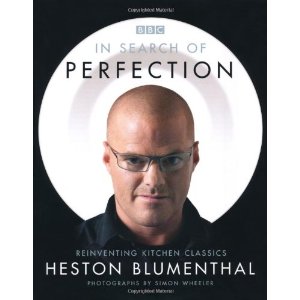
I don’t remember having anything there but I came upon this book called, “In Search of Perfection”.

In Search of Perfection

Inside the book were crazy recipes that uses crazy equipment that process crazy ingredients that were next to impossible to recreate with my average home utensils. I managed to watch the TV series that the book was based on & while inspiring, reinforced the idea that I can’t attempt these creations without putting serious time & money.

It was very educational & entertaining though because Heston’s idea of cooking is based on Science & not myths. He prefers to experiment to remove any guesswork from his recipes. This inspired me to enhance some of my current recipes & try new techniques.

New series with home-cooks in mind

Recently, while searching for Heston on Youtube, I came across a new BBC series called “How to Cook like Heston” which was aired in 2012. These recipes were much more approachable, uses simpler ingredients which are easier to source (dry ice versus liquid nitrogen) & uses every day kitchen utensils + a thermometer.

This motivated me to try something that’s really nice that most restaurant got it wrong.

Roast Chicken!

The Process & using local ingredients.

You can watch the video below.


Recipes are here.

Living in a HDB apartment in Singapore where space is limited, I’ve made some changes to the recipe to allow for tighter space.

For home-cooks, you need to buy an oven thermometer (your oven thermostat isn’t accurate enough,) a meat thermometer & plenty of cheap coarse salt. The washing bowl is replaced with salad spinner bowl (or any bowl that’s deep enough) & the UK chicken is replace with whole Kampong Chicken.

Other than these changes, Heston’s recipe should be fool-proof enough for anyone who’s had some experience in the kitchen.

For novice or noob, try something simpler (like Heston’s foolproof scrambled egg) because this recipe takes almost 4 hours to complete excluding the brining process (19 hours including) & you need to process the whole chicken (chopping off & ridding internals.) It can be devastating to spend so much time to fail.

The result was fantastic! The best roast chicken I’ve ever tasted! Move aside Kenny Rogers!

Brining the Chicken in 6% salt solution, making sure the whole chicken is covered.
After buttering the chicken, it's ready for slow bake.
After buttering the chicken, it’s ready for slow bake.
After slow bake, the skin should look raw.
After a quick blast of hot air, the skin will separate from the flesh & brown.

The process continue because I’ve saved the carcass for the next part, Chicken Stock, which requires milk powder & pressure cooker.

I’d post that next time!